Shader Binding Table (SBT) in Vulkan Ray Tracing
Table of Contents
- Overview
- Quick Start Guide
- Purpose and Function
- SBT Structure
- Understanding Shader Group Indices
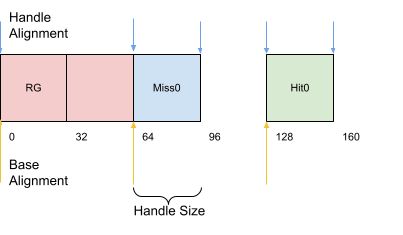
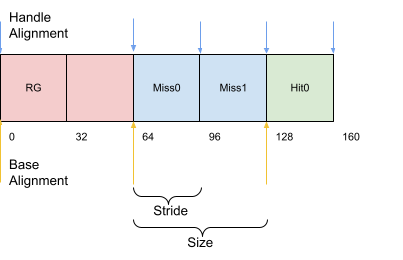
- Key Properties and Alignment
- SBT Generation Process
- Advanced SBT Features
- Usage in Ray Tracing
- Best Practices
- Common Pitfalls
Overview
The Shader Binding Table (SBT) is a fundamental component in Vulkan ray tracing that serves as the "blueprint" for the ray tracing process. Unlike traditional rasterization where shaders are bound sequentially for different objects, ray tracing requires all shaders to be available simultaneously since rays can hit any surface in the scene at any time.
The nvvk::SBTGenerator class is a helper utility that simplifies the complex process of creating and managing the SBT. It handles the intricate details of buffer creation, alignment calculations, and shader handle retrieval, making it easier to create the information that will be stored in the SBT buffer and retrieve the handles used by the ray tracer when calling vkCmdTraceRaysKHR.
Quick Start Guide
Here's the minimal code to get an SBT working in just 5 steps:
// 1. Initialize the SBT generator
nvvk::SBTGenerator sbtGen;
sbtGen.init(device, rayProperties);

// 2. Calculate required buffer size
size_t bufferSize = sbtGen.calculateSBTBufferSize(rtPipeline, pipelineInfo);

// 3. Create the SBT buffer
nvvk::Buffer sbtBuffer;
allocator.createBuffer(sbtBuffer, bufferSize,
    VK_BUFFER_USAGE_2_SHADER_BINDING_TABLE_BIT_KHR | VK_BUFFER_USAGE_2_SHADER_DEVICE_ADDRESS_BIT,
    VMA_MEMORY_USAGE_AUTO_PREFER_DEVICE,
    VMA_ALLOCATION_CREATE_MAPPED_BIT,
    sbtGen.getBufferAlignment());

// 4. Populate the SBT buffer with shader handles
sbtGen.populateSBTBuffer(sbtBuffer.address, bufferSize, sbtBuffer.mapping);

// 5. Use the SBT in ray tracing
vkCmdTraceRaysKHR(cmd,
    &sbtGen.getSBTRegions().raygen,    // Ray generation shader
    &sbtGen.getSBTRegions().miss,      // Miss shader
    &sbtGen.getSBTRegions().hit,       // Hit shader
    &sbtGen.getSBTRegions().callable,  // Callable shader (optional)
    width, height, 1);                 // Dimensions
What this does: - Step 1: Sets up the SBT generator with your device and ray tracing properties - Step 2: Calculates exact memory requirements (handles alignment automatically) - Step 3: Creates a properly aligned buffer for the SBT - Step 4: Fills the buffer with shader handles from your pipeline - Step 5: Uses the SBT to trace rays with your shaders
Prerequisites:
- A ray tracing pipeline create info (pipelineInfo) which was used to create the pipeline
- A ray tracing pipeline (rtPipeline) with shader groups
- A resource allocator (allocator) for buffer creation
- Ray tracing properties (rayProperties) from your physical device
This minimal setup handles all the complex alignment requirements and gives you a working SBT. See the sections below for advanced features like custom data, multiple shader groups, and performance optimization.
Purpose and Function
The SBT allows us to:
- Select which ray generation shader to use as the entry point
- Specify which miss shader to execute when no intersections are found
- Define which hit shader groups can be executed for each instance
- Associate instances with specific shader groups through the hitGroupId in the TLAS
Building and filling the SBT tells the implementation where shader records live in memory, but the runtime still has to pick the correct record for each intersection. For closest-hit and any-hit shaders, the Vulkan specification defines how that address is computed from the hit region you pass to vkCmdTraceRaysKHR, the instance data in the TLAS, the geometry order inside each BLAS, and the parameters on traceRayEXT (or the SPIR-V equivalent) in the shading language.
Hit-group record address (from the Vulkan specification): the device resolves the hit shader binding table record using the strided region’s base address and stride, multiplied by an index assembled from the acceleration structure and the trace call:
pHitShaderBindingTable->deviceAddress
  + pHitShaderBindingTable->stride
    × ( instanceShaderBindingTableRecordOffset
        + geometryIndex × sbtRecordStride
        + sbtRecordOffset )
What each part contributes:
| Term | Role |
|---|---|
pHitShaderBindingTable (deviceAddress, stride) |
These come from the hit VkStridedDeviceAddressRegionKHR you pass to vkCmdTraceRaysKHR. They describe where the hit section of the SBT lives and the byte stride between consecutive SBT records in that section (after alignment rules are satisfied). |
sbtRecordStride and sbtRecordOffset |
These are the arguments with the same names on traceRayEXT in GLSL (SPIR-V OpTraceRayKHR). They select which “slot” within a hit group’s set of records to use, relative to the base record chosen by the instance and geometry indices—typically you set sbtRecordStride to the byte size of one hit record (handle plus optional user data) so each geometry or logical material maps to a distinct record. |
instanceShaderBindingTableRecordOffset |
Stored per instance in VkAccelerationStructureInstanceKHR. You supply it when you build the TLAS: it is added into the formula above so different instances can point at different starting records in the hit SBT, independent of geometryIndex. |
geometryIndex |
For each bottom-level acceleration structure (BLAS), geometries are ordered implicitly by build order. VkAccelerationStructureBuildGeometryInfoKHR::geometryCount counts them; the pGeometries or ppGeometries array defines geometry 0, 1, … in that order. At intersection time, geometryIndex identifies which geometry in the referenced BLAS was hit—so your hit-group records must be laid out consistently with that ordering (and with any primitiveCount / multi-segment layouts you use when building each geometry). |
Ray generation and miss shaders use the raygen and miss regions from the same dispatch; their addressing uses a simpler index (no instance or geometry term). Callable shaders, if used, pull from the callable region. For hits, combine this formula with how each TLAS instance selects a pipeline hit group—this tutorial summarizes that link as hitGroupId—so instanceShaderBindingTableRecordOffset, geometryIndex, and traceRayEXT parameters line up with the records you packed into the hit region.
SBT Structure
The SBT consists of up to four arrays, each containing handles to shader groups:
- Ray Generation (RayGen) - Entry point for ray tracing
- Miss - Executed when rays don't hit anything
- Hit - Executed when rays intersect with geometry
- Callable - Optional shaders that can be invoked from other shaders
Buffer Layout
(64 bytes)"] end subgraph MG["Miss Group"] MG1["Handle
(64 bytes)"] end subgraph HG["Hit Group"] HG1["Handle
(64 bytes)"] HG2["Data
(variable)"] end subgraph CG["Callable Group"] CG1["Handle
(64 bytes)"] end subgraph SBT["Shader Binding Table Buffer"] RG MG HG CG end RG --- MG MG --- HG HG --- CG style RG1 fill:#FFFFFF style MG1 fill:#FFFFFF style HG1 fill:#FFFFFF style HG2 fill:#FFFFFF style CG1 fill:#FFFFFF style RG fill:#FFCDD2 style MG fill:#BBDEFB style HG fill:#C8E6C9 style CG fill:#E1BEE7 style SBT fill:#FFF
Note: While all group types can technically have user data attached, Hit groups are the primary use case for data attachment (e.g., material properties, per-instance data). RayGen, Miss, and Callable groups typically only contain shader handles.
Example of a raygen, miss and hit shader. (02_basic)
Example where there are two miss shaders. (05_shadow_miss)
Understanding Shader Group Indices
What are "indices"?
In the context of SBT, "indices" refer to the position (index) of shader groups within the ray tracing pipeline. When you create a pipeline with multiple shader groups, each group gets a sequential index starting from 0.
Example Pipeline Layout:
Pipeline Groups: [RayGen:0, Miss:1, Hit:2, Miss:3, Hit:4, Hit:5]
Group Types:     RayGen[0], Miss[1,3], Hit[2,4,5]
Why This Matters:
- SBT Mapping: The SBT maps pipeline group indices to actual shader handles
- Instance Association: TLAS instances use hitGroupId to reference specific SBT entries
- Shader Selection: The ray tracer uses these indices to determine which shader to execute
How Indices Are Used:
1. Automatic Discovery: addIndices() automatically finds all group indices from pipeline creation info
2. Manual Control: addIndex() allows manual specification for custom layouts
3. Data Association: User data is attached to specific indices via addData()
Special Cases: - Library Support: When using pipeline libraries, indices are offset to ensure uniqueness - Duplicate Entries: Multiple SBT entries can reference the same pipeline group (useful for different data)
→ Hit SBT Entry 0
→ Pipeline Group 2"] L["TLAS Instance 0"] O["hitGroupId = 1
→ Hit SBT Entry 1
→ Pipeline Group 4"] N["TLAS Instance 1"] Q["hitGroupId = 2
→ Hit SBT Entry 2
→ Pipeline Group 5"] P["TLAS Instance 2"] end subgraph subGraph3["Ray Tracing Execution"] S["Use hitGroupId = 0"] R["Ray hits Instance 0"] T["Look up Hit SBT Entry 0"] U["Execute Pipeline Group 2
(Hit Shader)"] end A --> B B --> C & I C --> D & J D --> E & K E --> F & J F --> G & K H --> I I --> J J --> K L --> M N --> O P --> Q R --> S S --> T T --> U G --> K K --> M & O & Q M --> S style A fill:#e1f5fe style H fill:#f3e5f5 style L fill:#e8f5e8 style R fill:#fff3e0 style subGraph0 fill:#fff
Key Properties and Alignment
The SBT relies on several Vulkan ray tracing properties:
shaderGroupHandleSize- Size of a program identifier (handle)shaderGroupHandleAlignment- Alignment in bytes for each SBT entryshaderGroupBaseAlignment- Alignment for starting addresses of each group
Alignment Rules
- RayGen Group: Must be aligned to
shaderGroupBaseAlignment - All Groups: Starting addresses must be aligned to
shaderGroupBaseAlignment - Individual Entries: Must be aligned to
shaderGroupHandleAlignment - RayGen Stride: Must equal the size (special case)
shaderGroupHandleAlignment
(e.g., 64 bytes)"] A["shaderGroupHandleSize
(e.g., 32 bytes)"] C["Base Alignment
shaderGroupBaseAlignment
(e.g., 256 bytes)"] end subgraph subGraph1["Stride Calculation Process"] E["handleSize aligned to
shaderGroupHandleAlignment"] D["Base Stride Calculation"] F{"User Data Exists?"} G["handleSize + dataSize
aligned to shaderGroupHandleAlignment"] H["handleSize aligned to
shaderGroupHandleAlignment"] I["Final Stride = MAX of all strides
for that group type"] end subgraph subGraph2["Memory Layout Example"] K["RayGen Section
Aligned to 256 bytes"] J["Buffer Start"] L["Miss Section
Aligned to 256 bytes"] M["Hit Section
Aligned to 256 bytes"] N["Callable Section
Aligned to 256 bytes"] end subgraph subGraph3["Individual Entry Alignment"] P["Padding to
shaderGroupHandleAlignment"] O["Entry 0
Handle + Data"] Q["Entry 1
Handle + Data"] R["Padding to
shaderGroupHandleAlignment"] S["Entry 2
Handle + Data"] end A --> B B --> C D --> E E --> F F -- Yes --> G F -- No --> H G --> I H --> I J --> K K --> L L --> M M --> N O --> P P --> Q Q --> R R --> S style B fill:#e8f5e8 style A fill:#ffebee style C fill:#e3f2fd style I fill:#fff3e0
Size Calculation Formula
// For each group type
stride = align_up(handleSize + dataSize, shaderGroupHandleAlignment);
size = align_up(count * stride, shaderGroupBaseAlignment);

// Total buffer size
totalSize = align_up(raygenSize, bufferAlignment) +
            align_up(missSize, bufferAlignment) +
            align_up(hitSize, bufferAlignment) +
            align_up(callableSize, bufferAlignment);
Why Stride Matters:
- Uniform Entry Size: All entries within a group must have the same size for the ray tracer to calculate offsets correctly
- Data Alignment: Each entry is aligned to
shaderGroupHandleAlignmentto ensure proper memory access - RayGen Special Case: RayGen stride must be aligned to
shaderGroupBaseAlignmentbecause it's the entry point
Stride Calculation Process:
1. Base Stride: Start with handleSize aligned to handleAlignment
2. Data Stride: If user data exists, calculate handleSize + dataSize aligned to handleAlignment
3. Final Stride: Use the maximum of all strides for that group type
4. Group Alignment: Each group section is aligned to shaderGroupBaseAlignment
SBT Generation Process
The nvvk::SBTGenerator class is a helper utility that simplifies the complex process of creating and managing the Shader Binding Table. It handles the intricate details of buffer creation, alignment calculations, and shader handle retrieval, making it easier to create the information that will be stored in the SBT buffer.
1. Initialization
2. Buffer Size Calculation
size_t bufferSize = sbtGenerator.calculateSBTBufferSize(
    rtPipeline, rayPipelineInfo, librariesInfo);
This calculates: - Required buffer size - Stride for each group type - Buffer offsets for each group - Total memory requirements
What happens internally:
- Group Index Discovery: The function analyzes the pipeline to find the position (index) of each shader group type:
- RayGen groups: Groups containing raygen shaders
- Miss groups: Groups containing miss shaders
- Hit groups: Groups containing closest-hit, any-hit, or intersection shaders
-
Callable groups: Groups containing callable shaders
-
Stride Calculation: For each group type, it calculates the required stride:
- Base stride:
handleSizealigned toshaderGroupHandleAlignment - Data stride: If user data is attached, the stride becomes
handleSize + dataSizealigned toshaderGroupHandleAlignment - Final stride: The maximum of all strides for that group type
-
Special case: RayGen stride must be aligned to
shaderGroupBaseAlignment -
Buffer Layout: Each group section is aligned to
shaderGroupBaseAlignment, ensuring proper memory layout for the ray tracer.
3. Buffer Creation
// Create SBT buffer with proper usage flags
VkBufferUsageFlags usage = VK_BUFFER_USAGE_2_SHADER_BINDING_TABLE_BIT_KHR |
                           VK_BUFFER_USAGE_2_SHADER_DEVICE_ADDRESS_BIT;

allocator.createBuffer(sbtBuffer, bufferSize, usage,
                      VMA_MEMORY_USAGE_AUTO_PREFER_DEVICE,
                      VMA_ALLOCATION_CREATE_MAPPED_BIT,
                      sbtGenerator.getBufferAlignment());
Important: The user is responsible for creating the buffer using the size and alignment information provided by calculateSBTBufferSize(). The SBT generator only calculates the requirements and populates the buffer - it does not create the buffer itself.
4. SBT Population
This process:
- Retrieves shader handles from the pipeline
- Copies handles to the SBT buffer
- Applies any user-provided data
- Calculates final device addresses
Technical Details:
- Handle Retrieval: Uses
vkGetRayTracingShaderGroupHandlesKHRto get all shader handles from the pipeline - Buffer Population: For each group type, writes handles and optional user data to the buffer:
- Handle: The shader program identifier (always present)
- User Data: Any additional data attached via
addData()(optional) - Stride: Each entry is padded to match the calculated stride for that group type
- Address Calculation: Converts buffer offsets to full device addresses for use in
vkCmdTraceRaysKHR
The buffer contains all the necessary data, and the handle provided to the ray tracer specifies where in the buffer the ray tracer should access this data.
Advanced SBT Features
Custom Data Attachment
The SBT can store custom data alongside shader handles:
struct HitRecordBuffer {
    std::array<float, 4> color;
};

// Add data to specific hit groups
sbtGenerator.addData(SBTGenerator::eHit, 0, hitData0);
sbtGenerator.addData(SBTGenerator::eHit, 1, hitData1);
See the tutorial 07_multi_closest_hit for an example.
Multiple Shader Groups
You can have more SBT entries than pipeline groups by duplicating entries:
// Pipeline has 2 hit groups, but SBT has 3
sbtGenerator.addIndices(rayPipelineInfo);  // Add groups 0, 1
sbtGenerator.addIndex(SBTGenerator::eHit, 2);  // Duplicate group 1
sbtGenerator.addData(SBTGenerator::eHit, 2, customData);  // Custom data for entry 2
See the tutorial 07_multi_closest_hit for an example.
Manual Group Index Specification
Instead of using addIndices(), you can manually specify group indices for complete control:
// Manually define group indices
sbtGenerator.addIndex(SBTGenerator::eRaygen, 0);   // RayGen group 0
sbtGenerator.addIndex(SBTGenerator::eMiss, 1);     // Miss group 1
sbtGenerator.addIndex(SBTGenerator::eMiss, 2);     // Miss group 2
sbtGenerator.addIndex(SBTGenerator::eHit, 3);      // Hit group 3
sbtGenerator.addIndex(SBTGenerator::eHit, 4);      // Hit group 4

// Add custom data to specific groups
sbtGenerator.addData(SBTGenerator::eHit, 3, hitData0);
sbtGenerator.addData(SBTGenerator::eHit, 4, hitData1);
Library Support
The SBT generator supports pipeline libraries:
std::vector<VkRayTracingPipelineCreateInfoKHR> libraries = {lib1, lib2};
sbtGenerator.addIndices(rayPipelineInfo, libraries);
Usage in Ray Tracing
Retrieving SBT Regions
const SBTGenerator::Regions sbtRegions = sbtGenerator.getSBTRegions();

// Access individual regions
VkStridedDeviceAddressRegionKHR raygenRegion = sbtRegions.raygen;
VkStridedDeviceAddressRegionKHR missRegion = sbtRegions.miss;
VkStridedDeviceAddressRegionKHR hitRegion = sbtRegions.hit;
VkStridedDeviceAddressRegionKHR callableRegion = sbtRegions.callable;
Tracing Rays
vkCmdTraceRaysKHR(cmdBuffer,
                   &sbtRegions.raygen,    // Ray generation shader
                   &sbtRegions.miss,      // Miss shader
                   &sbtRegions.hit,       // Hit shader
                   &sbtRegions.callable,  // Callable shader
                   width, height, 1);     // Dimensions
Best Practices
- Alignment: Always respect alignment requirements to avoid validation errors
- Memory Layout: Use the calculated offsets and strides from the generator
- Performance: Consider using device-local memory for production applications
- Debugging: Use debug names for SBT buffers in development tools
- Validation: Ensure buffer size matches calculated requirements exactly
Common Pitfalls
- Ignoring Alignment: Not aligning to required boundaries causes validation failures
- Buffer Size Mismatch: Using incorrect buffer size leads to undefined behavior
- Missing Usage Flags: Forgetting
VK_BUFFER_USAGE_2_SHADER_BINDING_TABLE_BIT_KHR - Stride Confusion: RayGen stride must equal size, other groups can have different strides
- Handle Index Mismatch: Incorrect mapping between pipeline groups and SBT entries