Sample source
Browse the full sample on GitHub: raytrace_tutorial/18_swept_spheres
18 Swept Spheres - Tutorial
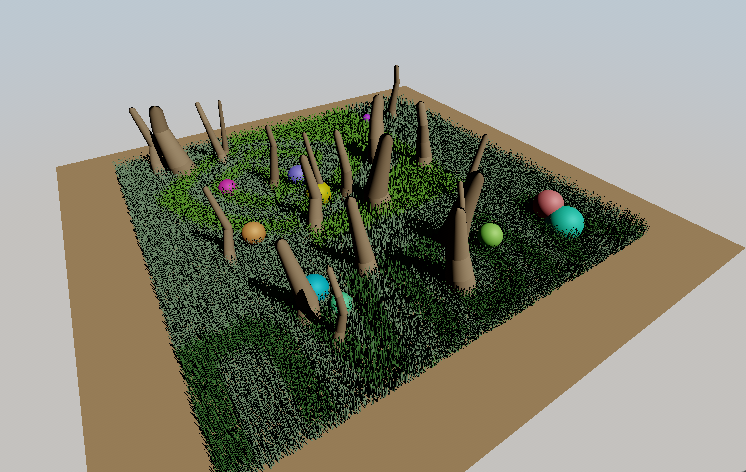
This tutorial demonstrates how to use the NVIDIA VK_NV_ray_tracing_linear_swept_spheres extension to efficiently render grass fields, standalone spheres, and multi-segment chains using specialized ray tracing primitives. The extension introduces two new geometric primitives—Spheres and Linear Swept Spheres (LSS)—that provide compact representation and hardware-accelerated intersection for sphere-based geometry.
Key Changes from 02_basic.cpp
1. Extension and Feature Setup
Modified: 18_swept_spheres.cpp (main function)
- Added VK_NV_RAY_TRACING_LINEAR_SWEPT_SPHERES_EXTENSION_NAME to device extensions
- Enabled VkPhysicalDeviceRayTracingLinearSweptSpheresFeaturesNV with both .linearSweptSpheres and .spheres features
- Added VK_PIPELINE_CREATE_2_RAY_TRACING_ALLOW_SPHERES_AND_LINEAR_SWEPT_SPHERES_BIT_NV flag to ray tracing pipeline
VkPhysicalDeviceRayTracingLinearSweptSpheresFeaturesNV linearSweptSpheresFeature{
    VK_STRUCTURE_TYPE_PHYSICAL_DEVICE_RAY_TRACING_LINEAR_SWEPT_SPHERES_FEATURES_NV
};

nvvk::ContextInitInfo vkSetup{
    // ...
    .deviceExtensions = {
        // ... other extensions
        {VK_NV_RAY_TRACING_LINEAR_SWEPT_SPHERES_EXTENSION_NAME, &linearSweptSpheresFeature, false},
    },
};
2. Geometry Creation
New: Scene Generation Functions
The tutorial creates three types of swept sphere geometries:
Grass Field (Linear Swept Spheres - LIST Mode):
- many grass blades randomly scattered in a 10×10 unit field
- Each blade represented by two vertices (root and tip) with corresponding radii
- Random height variations (0.2-0.5 units) and position jitter for natural appearance
- Radii taper from base (0.003-0.008) to tip (40% of base) for realistic grass blade shape
- Uses
VK_RAY_TRACING_LSS_INDEXING_MODE_LIST_NV- no index buffer needed - Vertices stored sequentially: pairs (0,1), (2,3), (4,5), etc. automatically form LSS primitives
void createGrassField(uint32_t grassBlades, glm::vec2 fieldSize) {
    for(uint32_t i = 0; i < grassBlades; i++) {
        glm::vec3 root(xPos, 0.0f, zPos);
        glm::vec3 tip(xPos + tilt, height, zPos + tilt);
        m_grassLSSVertices.push_back(root);  // Even index
        m_grassLSSVertices.push_back(tip);   // Odd index
        m_grassLSSRadii.push_back(radius);        // Base
        m_grassLSSRadii.push_back(radius * 0.4f); // Tip
    }
}
Standalone Spheres:
- 10 spheres with varying radii (0.15-0.45 units)
- Randomly positioned throughout the scene
- Uses
VK_GEOMETRY_TYPE_SPHERES_NVgeometry type - Each sphere defined by a center point and radius
- Used for decorative elements with colorful materials
Multi-Segment LSS Chains (Linear Swept Spheres - SUCCESSIVE Mode):
- 20 chains with 4 segments each (80 total segments)
- Simulate reeds, stalks, or tall grass stems
- Uses
VK_RAY_TRACING_LSS_INDEXING_MODE_SUCCESSIVE_NVwith index buffer - Efficient vertex storage: N+1 vertices for N segments per chain (no duplication)
- Connected segments form curved paths with seamless endcaps
- Chain separation detected by gaps in index sequence
// Chain with 4 segments uses 5 vertices (not 8):
// Vertices: [v0, v1, v2, v3, v4] for chain 0
//           [v5, v6, v7, v8, v9] for chain 1
// Indices:  [0, 1, 2, 3,  5, 6, 7, 8]
//                      └─ gap → new chain starts
3. BLAS Creation with New Geometry Types
Modified: createBottomLevelAS()
Three new BLAS structures are created using extension-specific geometry types:
Grass LSS BLAS (LIST Mode):
VkAccelerationStructureGeometryLinearSweptSpheresDataNV grassLSSData{};
grassLSSData.sType        = VK_STRUCTURE_TYPE_ACCELERATION_STRUCTURE_GEOMETRY_LINEAR_SWEPT_SPHERES_DATA_NV;
grassLSSData.vertexFormat = VK_FORMAT_R32G32B32_SFLOAT;
grassLSSData.vertexData   = {.deviceAddress = m_grassLSSVertexBuffer.address};
grassLSSData.vertexStride = sizeof(glm::vec3);
grassLSSData.radiusFormat = VK_FORMAT_R32_SFLOAT;
grassLSSData.radiusData   = {.deviceAddress = m_grassLSSRadiusBuffer.address};
grassLSSData.radiusStride = sizeof(float);
grassLSSData.indexType    = VK_INDEX_TYPE_NONE_KHR;  // No index buffer
grassLSSData.indexingMode = VK_RAY_TRACING_LSS_INDEXING_MODE_LIST_NV;
grassLSSData.endCapsMode  = VK_RAY_TRACING_LSS_PRIMITIVE_END_CAPS_MODE_CHAINED_NV;

VkAccelerationStructureGeometryKHR geometry{};
geometry.geometryType = VK_GEOMETRY_TYPE_LINEAR_SWEPT_SPHERES_NV;
geometry.pNext        = &grassLSSData;
Chains LSS BLAS (SUCCESSIVE Mode):
VkAccelerationStructureGeometryLinearSweptSpheresDataNV chainsLSSData{};
chainsLSSData.sType        = VK_STRUCTURE_TYPE_ACCELERATION_STRUCTURE_GEOMETRY_LINEAR_SWEPT_SPHERES_DATA_NV;
chainsLSSData.vertexFormat = VK_FORMAT_R32G32B32_SFLOAT;
chainsLSSData.vertexData   = {.deviceAddress = m_chainsLSSVertexBuffer.address};
chainsLSSData.vertexStride = sizeof(glm::vec3);
chainsLSSData.radiusFormat = VK_FORMAT_R32_SFLOAT;
chainsLSSData.radiusData   = {.deviceAddress = m_chainsLSSRadiusBuffer.address};
chainsLSSData.radiusStride = sizeof(float);
chainsLSSData.indexType    = VK_INDEX_TYPE_UINT32;  // Index buffer required
chainsLSSData.indexData    = {.deviceAddress = m_chainsLSSIndexBuffer.address};
chainsLSSData.indexStride  = sizeof(uint32_t);
chainsLSSData.indexingMode = VK_RAY_TRACING_LSS_INDEXING_MODE_SUCCESSIVE_NV;
chainsLSSData.endCapsMode  = VK_RAY_TRACING_LSS_PRIMITIVE_END_CAPS_MODE_CHAINED_NV;

VkAccelerationStructureGeometryKHR geometry{};
geometry.geometryType = VK_GEOMETRY_TYPE_LINEAR_SWEPT_SPHERES_NV;
geometry.pNext        = &chainsLSSData;
Spheres BLAS:
VkAccelerationStructureGeometrySpheresDataNV sphereData{};
sphereData.sType        = VK_STRUCTURE_TYPE_ACCELERATION_STRUCTURE_GEOMETRY_SPHERES_DATA_NV;
sphereData.centerFormat = VK_FORMAT_R32G32B32_SFLOAT;
sphereData.centerData   = {.deviceAddress = m_spheresDataBuffer.address};
sphereData.radiusFormat = VK_FORMAT_R32_SFLOAT;
sphereData.radiusData   = {.deviceAddress = m_spheresRadiusBuffer.address};

VkAccelerationStructureGeometryKHR geometry{};
geometry.geometryType = VK_GEOMETRY_TYPE_SPHERES_NV;
geometry.pNext        = &sphereData;
4. Shader Changes
New: rtsweptspheres.slang
Added four closest hit shaders for different primitive types:
- rchitMain - Ground plane (triangles)
- rchitMainGrass - Grass blades (LSS)
- rchitMainSpheres - Standalone spheres
- rchitMainChains - Multi-segment chains (LSS)
LSS Normal Calculation:
// Get LSS endpoints and radii from Slang's built-in function
// Returns float2x4: row 0 = [pos0.xyz, radius0], row 1 = [pos1.xyz, radius1]
float2x4 posAndRadii = GetLssPositionsAndRadii();
float3 vertex0 = float3(mul(float4(posAndRadii[0].xyz, 1.0), ObjectToWorld4x3()));
float3 vertex1 = float3(mul(float4(posAndRadii[1].xyz, 1.0), ObjectToWorld4x3()));

// Calculate normal perpendicular to LSS axis
float3 lssAxis = normalize(vertex1 - vertex0);
float3 toHit   = worldPos - vertex0;
float  t       = dot(toHit, lssAxis);
float3 closest = vertex0 + lssAxis * t;
float3 normal  = normalize(worldPos - closest);
Sphere Normal Calculation:
float3 worldPos = WorldRayOrigin() + WorldRayDirection() * RayTCurrent();
// Get sphere center and radius from Slang's built-in function
// Returns float4: [center.xyz, radius]
float3 sphereCenterWorld = float3(mul(float4(GetSpherePositionAndRadius().xyz, 1.0), ObjectToWorld4x3()));
float3 normal = normalize(worldPos - sphereCenterWorld);
5. Image-Based Grass Coloring
New: Texture Mapping Feature
Added UI-controlled image-based coloring for grass:
if(pushConst.useImageColoring && textures.count() > 0) {
    float2 uv = (worldPos.xz + float2(5.0, 5.0)) / 10.0;
    float3 texColor = textures[0].SampleLevel(uv, 0).xyz;
    albedo = lerp(albedo, texColor * albedo, pushConst.colorIntensity);
}
How It Works
Summary: Three Primitive Types
| Primitive Type | Geometry Type | Indexing Mode | Use Case | Vertices per Primitive |
|---|---|---|---|---|
| Grass Blades | LSS | LIST (no index buffer) | Independent grass strands | 2N for N blades |
| Standalone Spheres | Spheres | N/A | Decorative objects | 1 per sphere |
| Multi-Segment Chains | LSS | SUCCESSIVE (indexed) | Connected strands (reeds/stalks) | N+1 per N-segment chain |
Linear Swept Spheres (LSS)
A Linear Swept Sphere is defined by two points in space with associated radii. The primitive represents the volume swept by a sphere as it moves linearly from the first point to the second, with the radius interpolating between the two endpoint radii. This creates a capsule-like shape perfect for representing thin cylindrical objects like grass, hair, or fur.
Advantages: - Compact representation (2 vertices + 2 radii vs. many triangles) - Smooth silhouettes at any distance - Efficient hardware-accelerated intersection - Natural representation for strand-based geometry
Standalone Spheres
Simple sphere primitives defined by a center point and radius. These are a subset of LSS where both endpoints coincide, but are optimized specifically for sphere intersection.
Chain Separation with SUCCESSIVE Mode
When using VK_RAY_TRACING_LSS_INDEXING_MODE_SUCCESSIVE_NV with VK_RAY_TRACING_LSS_PRIMITIVE_END_CAPS_MODE_CHAINED_NV, the extension automatically detects chain boundaries by analyzing the index sequence.
How it works: - Each index K creates an LSS segment from vertex K to vertex K+1 - Consecutive indices (e.g., 5, 6, 7) indicate segments in the same chain - Non-consecutive indices (e.g., 7 → 10) indicate a new chain starting
Example with 2 chains of 3 segments each:
Vertices: [v0, v1, v2, v3,  v4, v5, v6, v7]
           └─ Chain 0 ─┘    └─ Chain 1 ─┘

Index buffer: [0, 1, 2,  4, 5, 6]
               └─────┘   └─────┘
               Chain 0   Chain 1
                      ↑
                   Gap (2 → 4) starts new chain

Chain 0 segments:
  - Segment 0: v0→v1 (both endcaps - first in chain)
  - Segment 1: v1→v2 (trailing endcap only)
  - Segment 2: v2→v3 (trailing endcap only)

Chain 1 segments:
  - Segment 3: v4→v5 (both endcaps - new chain detected)
  - Segment 4: v5→v6 (trailing endcap only)
  - Segment 5: v6→v7 (trailing endcap only)
Memory efficiency: - LIST mode: 2N vertices for N segments (duplicate shared vertices) - SUCCESSIVE mode: N+1 vertices per chain (shared vertices, 37.5% memory savings for 4-segment chains)
End Caps Modes
The extension supports different end cap modes for LSS:
- VK_RAY_TRACING_LSS_PRIMITIVE_END_CAPS_MODE_CHAINED_NV: When used with SUCCESSIVE mode, the first primitive in each chain has both endcaps enabled, while subsequent primitives only have the trailing endcap. This creates seamless connected chains without gaps.
- VK_RAY_TRACING_LSS_PRIMITIVE_END_CAPS_MODE_NONE_NV: All endcaps disabled (open-ended capsules)
Indexing Modes
VK_RAY_TRACING_LSS_INDEXING_MODE_LIST_NV: Sequential vertex pairs without an index buffer- Primitives formed from consecutive vertex pairs: (0,1), (2,3), (4,5), etc.
- Used by grass field - simple and efficient for disconnected strands
-
Requires 2N vertices for N primitives
-
VK_RAY_TRACING_LSS_INDEXING_MODE_SUCCESSIVE_NV: Indexed mode where each index K defines a segment from vertex K to vertex K+1 - Requires an index buffer with one index per primitive
- Used by LSS chains - efficient for multi-segment chains
- Requires N+1 vertices for N segments (shared vertices between segments)
- Chain separation: When indices are non-consecutive (e.g., [0,1,2, 5,6,7]), the gap indicates a new chain starts
- With CHAINED endcaps mode, new chains automatically get both endcaps on their first segment
Pipeline Requirements:
- VK_PIPELINE_CREATE_2_RAY_TRACING_ALLOW_SPHERES_AND_LINEAR_SWEPT_SPHERES_BIT_NV flag must be set
- Separate hit groups for each primitive type
- Standard VK_RAY_TRACING_SHADER_GROUP_TYPE_TRIANGLES_HIT_GROUP_KHR type works for all
Built-In Functions (from Slang Standard Library):
The extension's built-in variables are accessed through Slang's standard library functions:
- GetSpherePositionAndRadius() - Returns float4 containing sphere center (xyz) and radius (w)
- GetLssPositionsAndRadii() - Returns float2x4 matrix with two rows: [position0.xyz, radius0] and [position1.xyz, radius1]
- IsSphereHit() - Returns bool true if hit is on a sphere
- IsLssHit() - Returns bool true if hit is on an LSS
These functions are defined in hlsl.meta.slang and provide HLSL, CUDA/OptiX, and SPIRV implementations automatically. They map directly to the extension's SPIRV built-ins (HitSpherePositionNV, HitLSSPositionsNV, etc.).
Normal Calculation:
- For spheres: normal = normalize(hitPoint - sphereCenter)
- For LSS: Project hit point onto LSS axis, then calculate perpendicular normal
Limitations: - Extension is NVIDIA-specific - Requires RTX-capable hardware (Blackwell and newer)
Extension Support: If the extension is not available on your hardware, the tutorial will display an error message and show only the ground plane.