Sample source
Browse the full sample on GitHub: raytrace_tutorial/17_ray_query_screenspace
17 Ray Query Screen-Space Effects - Tutorial
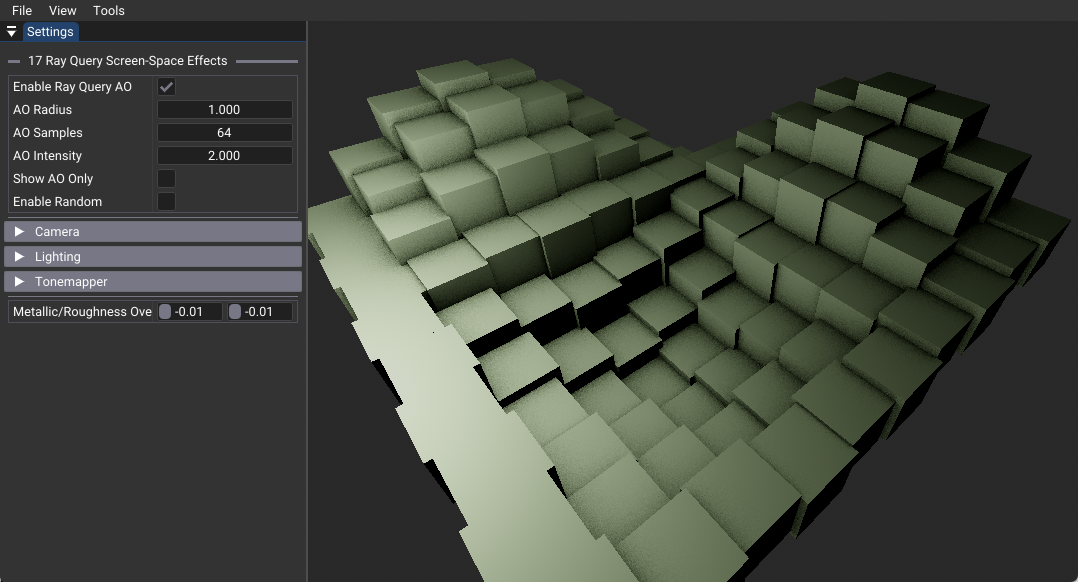
This tutorial demonstrates practical ray query usage in compute shaders for screen-space effects like ambient occlusion. It shows how to integrate ray tracing capabilities with existing rasterization pipelines for real-time screen-space effects without the complexity of full path tracing.
Key Learning Objective: Learn to use ray queries in compute shaders for efficient screen-space effects that complement traditional rasterization rendering.
Key Changes from 02_basic.cpp
1. Vulkan Extension Requirements
Added: Ray Query Extension Support
- Enables
VK_KHR_RAY_QUERY_EXTENSION_NAMEfor inline ray tracing in compute shaders - Allows ray queries without full ray tracing pipeline complexity
- Provides hardware-accelerated ray-scene intersection testing
2. Shader Architecture Changes
New: shaders/ray_query_screenspace.slang
Replaces traditional ray tracing pipeline with compute shader approach:
// Compute shader entry point for screen-space effects
[shader("compute")]
[numthreads(16, 16, 1)]
void main(uint3 threadIdx: SV_DispatchThreadID)
{
    // Extract G-buffer data for current pixel
    GBufferData gbuffer = extractGBufferData(pixelCoord);

    // Calculate ambient occlusion using ray queries
    float ao = calculateRayQueryAO(gbuffer.worldPos, gbuffer.worldNormal, seed);

    // Apply effect to final color
    outImage[pixelCoord] = baseColor * ao;
}
Enhanced: shaders/raster.slang
- Extended fragment shader (
foundation.slang) to output additional G-buffer data - Stores world position and compressed normals for screen-space processing
- Maintains compatibility with existing rasterization pipeline
3. C++ Application Changes
Modified: Pipeline Architecture
createRayTracingPipeline(): Creates compute pipeline instead of ray tracing pipelineapplyScreenSpaceEffects(): New function for compute shader dispatchcreateGBuffers(): Extended to include hit data buffer for G-buffer integration- Removed shader binding table (SBT) management complexity
Modified: Rendering Pipeline
- Hybrid approach: rasterization for G-buffer + compute for effects
- Uses
vkCmdDispatch()instead ofvkCmdTraceRaysKHR() - Processes only visible pixels for optimal performance
4. Data Structure Changes
New: Screen-Space Effect Parameters
- Added push constants for AO radius, sample count, and intensity
- G-buffer hit data structure for world position and normal storage
- Random seed generation for temporal stability
How It Works
Hybrid Rendering Pipeline
- Rasterization Pass: Generate G-buffer with world position and normals
- Ray Query Pass: Compute shader processes visible pixels using ray queries
- Effect Application: Apply ambient occlusion to base color
- Post-Processing: Standard tonemapping and display output
Ray Query Ambient Occlusion
The core technique samples a hemisphere around each surface point:
// Core AO calculation concept
float calculateRayQueryAO(float3 worldPos, float3 worldNormal, uint seed)
{
    float occlusion = 0.0f;

    // Sample multiple directions in hemisphere
    for(uint i = 0; i < sampleCount; i++)
    {
        float3 sampleDir = generateHemisphereSample(worldNormal, randomValue);

        // Test for occlusion using ray query
        if(traceRayQuery(worldPos, sampleDir, aoRadius))
            occlusion += 1.0f;
    }

    return 1.0f - (occlusion / sampleCount);
}
Performance Benefits
Compute Shader Advantages
Why Compute Shaders for Ray Queries: - Efficiency: Only processes visible pixels (no wasted computation on discarded fragments) - Control: Full algorithmic control over ray generation and processing - Integration: Easy combination with existing rasterization G-buffers - Performance: Avoids fragment shader early-Z rejection issues
Comparison with Fragment Shader Ray Queries:
| Approach | Wasted Computation | Performance | Use Case |
|---|---|---|---|
| Fragment Shader | High (discarded fragments) | Poor | Not recommended |
| Compute Shader | None (visible pixels only) | Good | Screen-space effects |
| Full RT Pipeline | None | Variable | Complex lighting |
Technical Implementation
Ray Query Usage
Ray queries provide inline ray tracing without pipeline complexity:
// Initialize and execute ray query
RayQuery<RAY_FLAG_ACCEPT_FIRST_HIT_AND_END_SEARCH> q;
q.TraceRayInline(topLevelAS, rayFlags, cullMask, rayDesc);

// Process results
while(q.Proceed()) { /* handle intersections */ }
bool hit = (q.CommittedStatus() != COMMITTED_NOTHING);
G-Buffer Integration
The tutorial demonstrates practical G-buffer usage: - World position storage for ray origin calculation - Normal compression for hemisphere sampling - Validity checking for pixel processing optimization
G-Buffer Design Trade-offs: - World Position Storage: This tutorial stores full world positions (RGB32F) for simplicity and precision - Alternative Approach: World position can be reconstructed from depth buffer using inverse view-projection matrix - Memory Consideration: Depth-only approach would use single R32_UINT for compressed normals vs RGBA32F for position+normal - Precision vs Memory: Direct storage provides better precision but increases G-buffer bandwidth
UI Controls and Parameters
Interactive controls for real-time experimentation: - Enable Ray Query AO: Toggle effect on/off - AO Radius: Occlusion testing distance (0.1-5.0 units) - AO Samples: Ray count per pixel (1-128 samples) - AO Intensity: Effect strength multiplier - Show AO Only: Debug visualization mode
Integration Strategies
Existing Pipeline Integration
This approach easily integrates with existing renderers: 1. Add G-buffer output to existing rasterization shaders 2. Create compute shader for desired screen-space effect 3. Dispatch compute shader after rasterization pass 4. Combine results in composition or post-processing stage
Performance Scaling
- Sample Count: Balance quality vs performance (8-16 typical for real-time)
- Ray Distance: Limit for performance (1-2 world units typical)
- Resolution: Can run effects at reduced resolution
- G-Buffer Bandwidth: Consider memory-efficient layouts (depth reconstruction vs direct position storage)
- Temporal Methods: Accumulate samples across frames for quality (requires additional complexity)
Applications Beyond AO
This technique enables various screen-space effects:
- Screen-Space Reflections: Single reflection ray per pixel
- Contact Shadows: Short shadow rays for contact points
- Local Global Illumination: Single-bounce indirect lighting
- Screen-Space Subsurface Scattering: Volumetric light transport
Best Practices
Ray Query Optimization
- Use appropriate ray flags for the specific effect
- Limit ray distances for performance
- Offset ray origins to avoid self-intersection
- Implement good random sampling for quality
Production Considerations
- Ensure G-buffer data accuracy and precision
- Consider temporal accumulation for noise reduction
- Implement adaptive quality based on performance targets
- Plan for graceful degradation on non-RT hardware
Hardware Requirements
- VK_KHR_ray_query extension support required
- Ray tracing capable GPU recommended for performance
- Recent drivers with ray query implementation
Advanced Techniques
Temporal Accumulation
For production-quality results, consider temporal accumulation: - Concept: Accumulate AO samples across multiple frames for smoother results - Benefits: Reduces noise, allows lower per-frame sample counts, improves visual quality - Implementation: Requires additional history buffer and temporal reprojection pass - Complexity: Beyond this tutorial's scope but valuable for production use
G-Buffer Optimization
Alternative G-buffer layouts for memory efficiency:
// Current approach (tutorial): RGBA32F for position + compressed normal
// Memory efficient: R32_UINT for compressed normal only
// Reconstruct position: worldPos = reconstructFromDepth(screenUV, depthBuffer, invViewProj);
Next Steps
- Implement additional screen-space effects using the same framework
- Add temporal accumulation for production-quality results
- Explore G-buffer optimization techniques for memory efficiency
- Integrate with existing game engine pipelines
- Implement denoising techniques for lower sample counts