Sample source
Browse the full sample on GitHub: raytrace_tutorial/14_animation
14 Animation - Tutorial
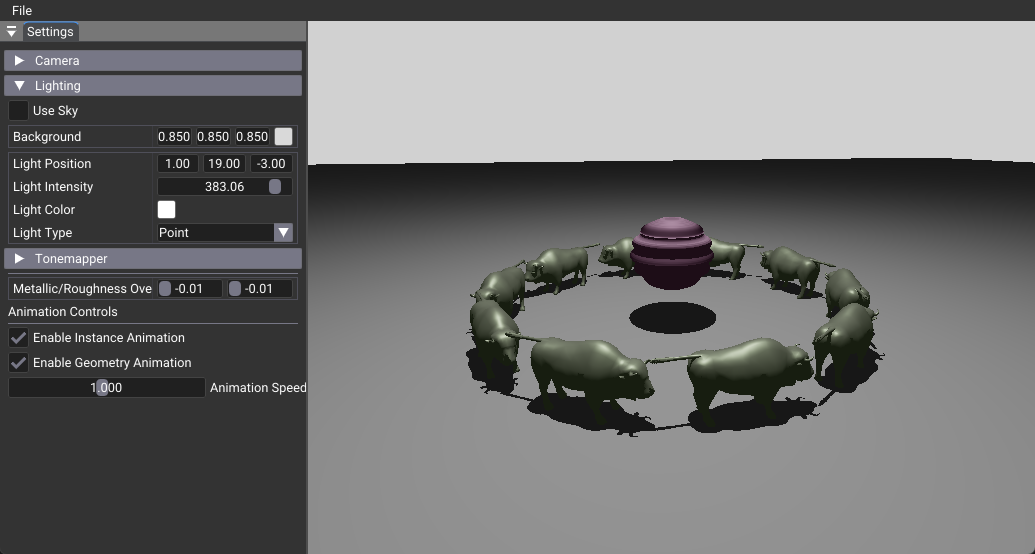
This tutorial demonstrates real-time animation in ray tracing using two distinct approaches: instance animation through TLAS updates and geometry animation via compute shaders. It shows how to create dynamic, interactive ray-traced scenes with proper acceleration structure management and GPU-based vertex deformation.
Key Changes from 02_basic.cpp
1. Shader Changes
Modified: shaders/animation.slang
- Uses the same ray tracing shader structure as the base tutorial
- No changes to core ray generation, closest hit, or miss shaders
- Maintains compatibility with animated geometry through standard vertex attribute access
New: shaders/vertex_animation.slang
- Compute shader for in-place vertex animation using wave mathematics
- Operates directly on GPU vertex buffers to avoid CPU-GPU transfers
- Calculates both animated positions and normals for proper lighting
[shader("compute")]
[numthreads(64, 1, 1)]
void main(uint3 threadId: SV_DispatchThreadID)
{
  // Get vertex data from gltfBuffer
  float3* posPtr = getAttribute<float3>(mesh.gltfBuffer, mesh.triMesh.positions, vertexIndex);

  // Calculate wave-deformed position
  float3 animatedPos = calculateWavePosition(*posPtr, pushConst.time, amplitude, frequency, speed);

  // Write back to buffer in-place
  posPtr[0] = animatedPos;
}
2. C++ Application Changes
Modified: 14_animation.cpp
- Added animation state variables and UI controls
- Implemented onRender() override for per-frame animation updates
- Created separate compute pipeline for vertex animation
- Added methods for instance and geometry animation
// Animation state management
float m_animationTime = 0.0f;
float m_animationSpeed = 1.0f;
bool m_enableInstanceAnimation = true;
bool m_enableGeometryAnimation = false;

// Per-frame animation update
void onRender(VkCommandBuffer cmd) override
{
  m_animationTime = deltaTime * m_animationSpeed;

  if(m_enableInstanceAnimation) animateInstances(cmd);
  if(m_enableGeometryAnimation) animateGeometry(cmd);

  RtBase::onRender(cmd);
}
3. Data Structure Changes
New: VertexAnimationPushConstant
- Push constant structure for compute shader parameters
- Contains animation time and mesh buffer reference
- Enables efficient parameter passing to compute shaders
Modified: Acceleration Structure Creation
- Both BLAS and TLAS built with VK_BUILD_ACCELERATION_STRUCTURE_ALLOW_UPDATE_BIT_KHR
- Enables efficient updates without full rebuilds
- Critical for real-time animation performance
4. UI Changes
New: Animation Controls - Toggle switches for instance and geometry animation - Speed slider for animation rate control (0.1x to 2.0x) - Real-time parameter adjustment during rendering
How It Works
Instance Animation
Instance animation updates transformation matrices in the TLAS (Top-Level Acceleration Structure) each frame. Multiple Wuson models rotate in a circle by:
1. Calculating new transformation matrices based on animation time
2. Updating TLAS instance data with new transforms
3. Using cmdUpdateAccelerationStructure for efficient TLAS rebuilding
4. Applying proper memory barriers for synchronization
Geometry Animation
Geometry animation modifies vertex positions directly on the GPU using a compute shader: 1. Compute shader reads original vertex positions from the GLTF buffer 2. Applies wave-based deformation using sine wave mathematics 3. Calculates new normals for proper lighting 4. Writes animated data back to the same buffer in-place 5. Updates the sphere's BLAS (Bottom-Level Acceleration Structure)
Benefits
- Performance: In-place GPU animation eliminates CPU-GPU data transfers
- Flexibility: Two animation types can be combined or used independently
- Real-time: Smooth 60+ FPS animation with proper acceleration structure updates
- Interactive: UI controls allow runtime parameter adjustment
- Scalable: Instance animation can handle many objects efficiently
Technical Details
Acceleration Structure Updates
Unlike static scenes, animated ray tracing requires acceleration structure updates: - TLAS Updates: Efficient for instance animation, updates only transform data - BLAS Updates: Required for geometry animation, rebuilds spatial structure - Memory Barriers: Essential for synchronization between compute and ray tracing operations
Wave Animation Mathematics
The geometry animation uses radial wave deformation:
- Waves travel along the Y-axis with configurable frequency and speed
- Radial displacement pushes vertices outward from the sphere center
- Normal recalculation ensures proper lighting on deformed surfaces
- Uses abs(wave) for outward-only displacement
Performance Considerations
- Workgroup Size: 64 threads per compute workgroup for optimal GPU utilization
- Update Frequency: Both animation types update every frame for smooth motion
- Memory Coherency: In-place buffer updates maintain cache efficiency
- Barrier Usage: Minimal barriers only where necessary for correctness
Usage Instructions
- Instance Animation: Enable to see Wuson models rotating in a circle
- Geometry Animation: Enable to see the sphere with wave deformation
- Animation Speed: Adjust from 0.1x (slow) to 2.0x (fast) for different effects
- Combined Effects: Both animations can run simultaneously for complex scenes
The tutorial demonstrates that ray tracing can handle dynamic content efficiently when acceleration structures are properly managed and GPU compute is leveraged for geometry updates.