Sample source
Browse the full sample on GitHub: raytrace_tutorial/11_shader_execution_reorder
Ray Tracing Tutorial - 11 Shader Execution Reorder
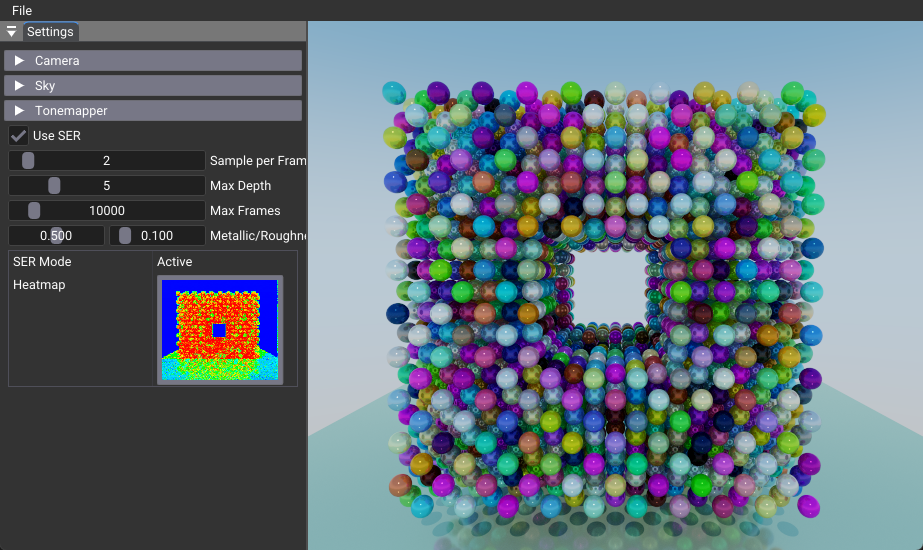
This tutorial demonstrates Shader Execution Reorder (SER), an advanced GPU optimization technique that improves ray tracing performance by reducing execution divergence. SER intelligently reorders shader invocations based on their execution characteristics, leading to significant performance gains in complex scenes with varied materials and lighting.
Key Changes from 02_basic.cpp
1. Shader Changes
Modified: shaders/shader_execution_reorder.slang
- SER Integration: Replaces traditional
TraceRay()calls withHitObject::TraceRay()andReorderThread()for optimized execution - Specialization Constants: Uses
USE_SERconstant to avoid maintaining separate shader variants, but still requires pipeline recreation when toggling SER on/off - Path Tracing: Implements full path tracing with multiple bounces, Russian roulette, and physically-based lighting
- Heatmap Visualization: Adds real-time execution divergence visualization using GPU clock measurements
// SER-enhanced ray tracing
if(USE_SER == 1) {
    HitObject hitObj = HitObject::TraceRay(topLevelAS, rayFlags, 0xFF, 0, 0, 0, ray, payload);
    ReorderThread(hitObj);

    if(hitObj.IsHit()) {
        // Manual hit processing for better control
        uint instanceID = hitObj.GetInstanceIndex();
        // ... process hit information
    }
} else {
    // Traditional ray tracing
    TraceRay(topLevelAS, rayFlags, 0xff, 0, 0, 0, ray, payload);
}
2. C++ Application Changes
Modified: 11_shader_execution_reorder.cpp
- SER Extension Support: Adds
VK_NV_RAY_TRACING_INVOCATION_REORDER_EXTENSION_NAMEfor SER functionality - Complex Scene Generation: Creates a hollow box of spheres (20x20x20 grid) with 128 unique materials to demonstrate divergence
- Frame Management: Implements progressive rendering with temporal accumulation and automatic frame resets
- Heatmap System: Adds GPU buffer for execution statistics and real-time heatmap visualization
3. Data Structure Changes
New Push Constants:
maxSamples: Controls samples per frame (1-16)maxDepth: Controls ray bounce depth (1-20)frame: Current frame number for accumulationmetallicRoughnessOverride: Material property overrides
New Descriptor Bindings:
eHeatmap: Storage image for heatmap visualizationeHeatStats: Storage buffer for execution time statistics
4. UI Changes
New Controls:
- SER Toggle: Enable/disable SER with real-time pipeline recreation
- Heatmap Visualization: Toggle between final image and execution heatmap
- Path Tracing Parameters: Samples per frame, max depth, max frames
- Material Override: Metallic/roughness sliders for divergence testing
How It Works
Execution Divergence Problem
In traditional ray tracing, threads within a warp (32 threads on NVIDIA GPUs) may follow different execution paths:
- Some rays hit geometry, others miss
- Rays hit different material types requiring different shading computations
- Different geometric complexity leads to varying computation time
This divergence reduces GPU efficiency as threads must wait for the slowest thread in the warp.
SER Solution
SER works by:
- Ray Classification: Grouping rays with similar execution characteristics
- Thread Reordering: Rearranging threads so similar rays execute together
- Improved Cache Locality: Better memory access patterns
- Reduced Divergence: More uniform execution within warps
Key SER API Functions
// Create a HitObject instead of directly tracing rays
HitObject hitObj = HitObject::TraceRay(topLevelAS, rayFlags, mask, sbtRecordOffset,
                                       sbtRecordStride, missIndex, ray, payload);

// Reorder threads based on ray characteristics
ReorderThread(hitObj);

// Process the hit/miss result
if(hitObj.IsHit()) {
    // Handle hit case
    uint instanceID = hitObj.GetInstanceIndex();
    float3 barycentrics = hitObj.GetAttributes<float3>();
    // ... process hit
} else {
    // Handle miss case
}
Benefits
Performance Improvements
SER provides significant performance gains in scenarios with:
- Complex scenes with varied material properties
- Mixed ray types (primary rays, shadow rays, reflection rays)
- Geometric complexity variations across the scene
- Texture access patterns that benefit from improved cache locality
- Natural or artificial divergence in shader execution
When SER Helps Most
- Path tracing with multiple bounces and complex materials
- Scenes with varied lighting and material interactions
- Mixed geometric complexity (simple and complex objects)
- Real-time rendering where every performance gain matters
When SER May Not Help
- Simple, uniform scenes with minimal divergence
- Scenes with uniform materials and lighting
- Extremely simple shaders with minimal computation
- Memory-bound scenarios where execution divergence isn't the bottleneck
Technical Details
Vulkan Extensions Required
This tutorial requires:
VK_NV_RAY_TRACING_INVOCATION_REORDER_EXTENSION_NAME: Enables SER functionalityVK_KHR_shader_clock: EnablesgetRealtimeClock()in shaders for heatmap timing measurements
Scene Design for Divergence
The tutorial creates a complex scene specifically designed to demonstrate SER benefits:
- Hollow Box of Spheres: A 20x20x20 grid with hollow center to create varied ray paths
- Varied Materials: 128 unique materials with different properties
- Artificial Divergence: Dummy computation loops based on instance ID to simulate real-world divergence
- Ground Plane: A reflective surface for additional lighting complexity
Specialization Constants
The tutorial uses Vulkan specialization constants to enable runtime toggling:
This allows switching between SER and traditional ray tracing without pipeline recreation, enabling real-time performance comparison.
Heatmap Visualization
The tutorial includes a real-time heatmap to visualize execution divergence:
- Red areas: High divergence (slow execution)
- Blue areas: Low divergence (fast execution)
- Green/Yellow areas: Medium divergence
This helps identify which areas of the scene benefit most from SER optimization.
Usage Instructions
Interactive Controls
The tutorial provides comprehensive controls for experimentation:
SER Controls:
- Use SER Checkbox: Toggle between SER and traditional ray tracing
- SER Mode Display: Shows whether SER is active or not available
Rendering Controls:
- Samples per Frame: Adjust ray samples (1-16)
- Max Depth: Control ray bounce depth (1-20)
- Max Frames: Set accumulation frame limit (1-100,000, default: 10,000)
Material Controls:
- Metallic/Roughness Slider: Override material properties to see divergence effects (default: 0.5, 0.1)
Visualization Controls:
- Heatmap Toggle: Switch between final image and heatmap
- Frame Reset: Automatically resets when camera or settings change
Performance Tips
- Design for Divergence: Create scenes that naturally have execution divergence to see SER benefits
- Material Variety: Use different material types that require different computation
- Geometric Complexity: Mix simple and complex geometry
- Ray Types: Combine different ray types (primary, secondary, shadow)
- Monitor Heatmap: Use the heatmap to identify areas that benefit from SER
Frame Management
The tutorial includes sophisticated frame management:
- Automatic Reset: Frames reset when camera position, FOV, or settings change
- Accumulation: Progressive rendering with temporal accumulation
- Frame Limits: Configurable maximum frame count for performance testing (default: 10,000)
- Real-time Updates: Immediate response to parameter changes
Summary
Shader Execution Reorder represents a significant advancement in GPU ray tracing optimization. By reducing execution divergence through intelligent thread reordering, SER can provide substantial performance improvements in complex ray tracing scenarios.
Key Takeaways:
- SER is most beneficial when there's natural execution divergence in ray tracing workloads
- The heatmap visualization helps identify areas that benefit from SER optimization
- In uniform, simple scenes, SER overhead may outweigh benefits
- In complex scenes with varied materials and lighting, SER provides significant performance gains
- Specialization constants enable runtime toggling between SER and traditional ray tracing
This tutorial demonstrates the basic integration of SER into a ray tracing pipeline and provides a foundation for more advanced SER usage in production renderers.
References
-
NVIDIA Developer Blog. "Improve Shader Performance and In-Game Frame Rates with Shader Execution Reordering." NVIDIA Developer Blog. https://developer.nvidia.com/blog/improve-shader-performance-and-in-game-frame-rates-with-shader-execution-reordering/
-
NVIDIA Developer Blog. "Path Tracing Optimization in Indiana Jones: Shader Execution Reordering and Live State Reductions." NVIDIA Developer Blog, 2024. https://developer.nvidia.com/blog/path-tracing-optimization-in-indiana-jones-shader-execution-reordering-and-live-state-reductions/