Sample source
Browse the full sample on GitHub: raytrace_tutorial/07_multi_closest_hit
07 Multiple Closest Hit Shaders - Tutorial
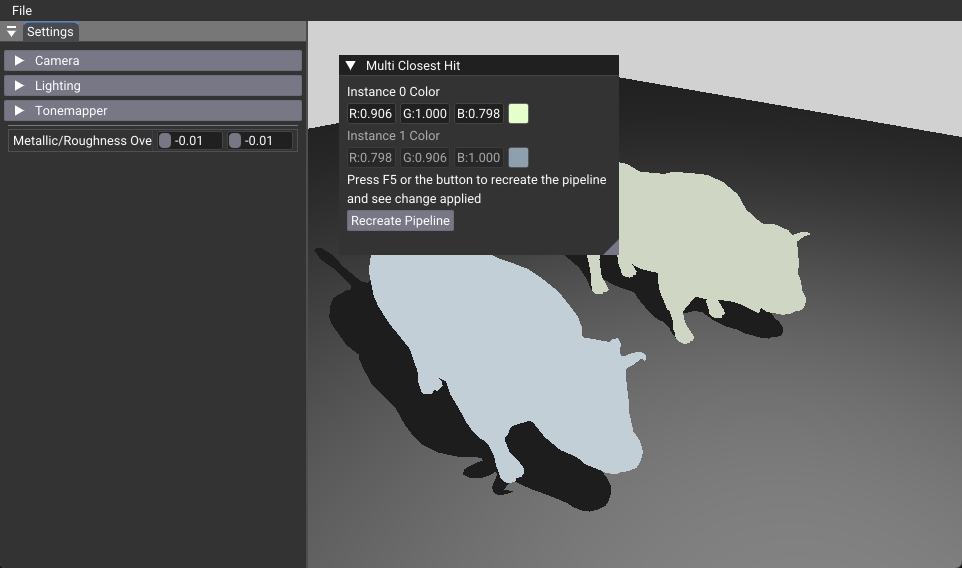
This tutorial demonstrates how to use multiple closest hit shaders in Vulkan ray tracing, enabling different objects to use different shaders and per-instance material properties. The main learning objective is to understand how to configure the Shader Binding Table (SBT) for multiple shader variants and pass instance-specific data through shader record buffers.
Key Changes from 02_basic.cpp
1. Shader Changes
Modified: rtmulticlosesthit.slang
- Added three different closest hit shader entry points (rchitMain, rchitMain2, rchitMain3)
- Implemented shader record data access for per-instance color properties
- Each shader uses different material properties (standard PBR vs. shader record colors)
// Shader record data declaration
[[vk::shaderRecordEXT]] buffer sr_ { float4 shaderRec; };

// Usage in rchitMain2 and rchitMain3
float3 albedo = shaderRec.rgb;  // Use color from SBT instead of material
2. C++ Application Changes
Modified: 07_multi_closest_hit.cpp
- Added shader record data structure and storage for per-instance colors
- Extended pipeline creation to support multiple closest hit shaders
- Modified SBT generation to include shader record data for specific hit groups
- Added instance-to-shader-group mapping for different rendering behaviors
// Shader record data structure
struct HitRecordBuffer
{
  glm::vec3 color;
};

// Instance-to-shader mapping
m_shaderGroupIndices[0] = 0;  // Plane: standard PBR
m_shaderGroupIndices[1] = 1;  // First wuson: shader record color
m_shaderGroupIndices[2] = 2;  // Second wuson: shader record color
3. Data Structure Changes
Modified: Pipeline and SBT configuration
- Extended StageIndices enum to include multiple closest hit shaders
- Added shader record data to specific SBT hit groups
- Configured instanceShaderBindingTableRecordOffset for each instance
4. UI Changes
Modified: onUIRender() function
- Added color picker controls for each wuson instance
- Implemented real-time shader record data updates
- Added pipeline recreation button for shader modifications
How It Works
The tutorial creates a scene with three objects using different closest hit shaders:
- Plane: Uses standard PBR lighting (rchitMain)
- First wuson: Uses shader record data for green color (rchitMain2)
- Second wuson: Uses shader record data for cyan color (rchitMain3)
Each instance specifies which shader group to use via instanceShaderBindingTableRecordOffset, allowing the ray tracing pipeline to select the appropriate closest hit shader at runtime.
Benefits
- Performance: Different shaders can be optimized for specific use cases
- Flexibility: Each instance can have completely different rendering behavior
- Memory Efficiency: Shader record data is more efficient than uniform buffers for per-instance data
- Scalability: Easy to add more instances with different shaders
- Real-time Control: Shader record data can be updated dynamically
Technical Details
Shader Binding Table Organization
- Group 0: Ray generation shader
- Group 1: Miss shader
- Group 2: Hit group 0 (Plane - standard PBR)
- Group 3: Hit group 1 (First wuson - shader record data)
- Group 4: Hit group 2 (Second wuson - shader record data)
Shader Record Data
Shader record data allows passing instance-specific data directly through the SBT, avoiding the overhead of uniform buffer updates. This is particularly useful for per-instance material properties, animation parameters, or other instance-specific data.
Performance Considerations
- Shader record data is stored in the SBT and accessed directly by shaders
- No additional descriptor set bindings required for per-instance data
- More efficient than using uniform buffers for frequently changing per-instance data
Usage Instructions
The tutorial includes interactive controls to: - Modify the color of the first wuson instance (fully functional) - Modify the color of the second wuson instance (requires shader modification to enable) - Recreate the pipeline to apply shader changes (F5 key or UI button)
Color values are automatically converted between sRGB and linear color spaces for proper display and rendering.
Related Tutorials
- 03_any_hit: Any-hit shaders and transparency
- 06_reflection: Reflections with ray tracing
- 05_shadow_miss: Shadow miss shaders