Sample source
Browse the full sample on GitHub: raytrace_tutorial/15_micro_maps_opacity
15 Micro-Maps Opacity - Tutorial
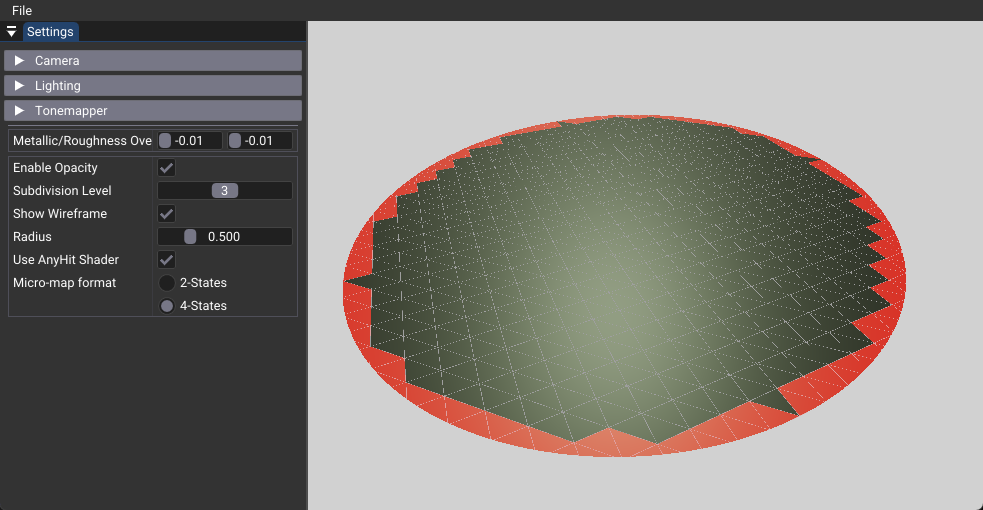
This tutorial demonstrates Opacity Micro-Maps, a Vulkan extension that enables efficient ray tracing with selective AnyHit shader invocation. Micro-maps provide hardware-accelerated triangle subdivision for fine-grained opacity control without the performance overhead of traditional geometry subdivision. The main learning objective is to understand how micro-maps can optimize ray-triangle intersection testing by encoding visibility information at the sub-triangle level.
Key Changes from 02_basic.cpp
1. Shader Changes
Added: rahit.slang (AnyHit Shader)
- Introduces the AnyHit shader stage for selective ray acceptance/rejection
- Implements radius-based opacity testing to cut out circular regions from the plane
- Demonstrates how micro-maps can reduce AnyHit shader calls by pre-classifying triangle regions
[shader("anyhit")]
void rahitMain(inout HitPayload payload, in BuiltInTriangleIntersectionAttributes attr)
{
    float3 pos = WorldRayOrigin() + WorldRayDirection() * RayTCurrent();

    // Cut out regions outside the radius
    if((pushConst.useAnyHit == 1) && (length(pos) > pushConst.radius))
    {
        IgnoreHit();
        return;
    }

    payload.color = float3(1.0F, 0.0F, 0.0F);  // Red tint to show AnyHit was called
    AcceptHitAndEndSearch();
}
2. C++ Application Changes
Modified: 15_micro_maps_opacity.cpp
- Adds
MicromapProcessclass for managing micro-map creation and data - Introduces
BirdCurveHelperclass for efficient triangle subdivision - Extends acceleration structure creation to support micro-map attachment
- Adds UI controls for real-time parameter adjustment
New Class Members
struct MicroMapsSettings {
    bool enableOpacity{true};
    int subdivLevel{3};
    float radius{0.5f};
    bool useAnyHit{true};
    uint16_t micromapFormat{VK_OPACITY_MICROMAP_FORMAT_4_STATE_EXT};
} m_mmSettings;

std::unique_ptr<MicromapProcess> m_micromapProcess;
3. Data Structure Changes
Modified: Push Constants
- Adds
radiusparameter for controlling opacity cutoff distance - Adds
useAnyHitflag for toggling AnyHit shader functionality - Adds
numBaseTrianglesfor wireframe visualization
New Buffer Types
- Micro-map value buffer storing opacity states per micro-triangle
- Micro-map triangle buffer with subdivision and format information
- Micro-map index buffer for triangle-to-micro-map mapping
4. Pipeline Changes
Modified: createRayTracingPipeline()
- Enables micro-map support with
VK_PIPELINE_CREATE_RAY_TRACING_OPACITY_MICROMAP_BIT_EXT - Adds AnyHit shader group to the ray tracing pipeline
- Extends shader group count to accommodate the new shader stage
5. Acceleration Structure Changes
Modified: createBottomLevelAS()
- Attaches micro-map data to triangle geometry using
VkAccelerationStructureTrianglesOpacityMicromapEXT - Enables micro-map updates with
VK_BUILD_ACCELERATION_STRUCTURE_ALLOW_OPACITY_MICROMAP_UPDATE_EXT - Links micro-map buffers to acceleration structure geometry
How It Works
Micro-Map Concept
Opacity Micro-Maps encode visibility information for triangle sub-regions at a much finer granularity than traditional geometry. Instead of subdividing geometry into smaller triangles, micro-maps store per-micro-triangle opacity states that the ray tracing hardware uses to make intelligent decisions about ray-triangle intersections.
Each micro-triangle can be classified into three states:
- Fully Opaque: Rays always hit these regions (no AnyHit shader call needed)
- Fully Transparent: Rays ignore these regions completely (hardware automatically skips)
- Unknown Transparent: Requires AnyHit shader evaluation to determine visibility
Bird Curve Subdivision
The Bird Curve algorithm provides an efficient way to subdivide triangles while maintaining spatial coherence. It converts micro-triangle indices to barycentric coordinates and interpolates vertex positions to determine each micro-triangle's location within the parent triangle.
Triangle-Circle Intersection
The core algorithm determines micro-triangle opacity by testing intersection with a circular region during micro-map generation. This pre-computes which micro-triangles are inside, outside, or partially inside the opacity region, allowing the hardware to make fast intersection decisions.
Benefits
Selective AnyHit Shader Invocation
Traditional ray tracing with transparency requires the AnyHit shader to be called for every ray-triangle intersection. With micro-maps:
- Fully Opaque regions: No AnyHit shader call needed
- Fully Transparent regions: Ray automatically ignored
- Unknown regions: AnyHit shader called only when necessary
Memory Efficiency
Micro-maps provide fine-grained opacity control without the memory overhead of geometry subdivision:
- Traditional subdivision: 3 vertices per triangle × 4 bytes = 12 bytes per triangle
- Micro-maps (level 3, 2-state): 64 micro-triangles × 1 bit = 8 bytes total
Hardware Acceleration
Modern GPUs have dedicated hardware for micro-map processing, providing faster intersection testing, reduced memory bandwidth requirements, and better cache utilization for micro-map data.
Technical Details
Micro-Map Formats
2-State Format: 1 bit per micro-triangle (Opaque/Transparent) - 8 triangles per byte 4-State Format: 2 bits per micro-triangle (Opaque/Transparent/Unknown Transparent) - 4 triangles per byte
Subdivision Levels
| Level | Micro-Triangles | Memory (2-state) | Memory (4-state) |
|---|---|---|---|
| 1 | 4 | 0.5 bytes | 1 byte |
| 2 | 16 | 2 bytes | 4 bytes |
| 3 | 64 | 8 bytes | 16 bytes |
| 4 | 256 | 32 bytes | 64 bytes |
| 5 | 1024 | 128 bytes | 256 bytes |
UI Controls
The tutorial provides real-time controls for experimentation:
- Enable Opacity: Toggle micro-maps functionality
- Subdivision Level: Adjust micro-triangle detail (1-5)
- Show Wireframe: Visualize geometry structure
- Radius: Control opacity cutoff distance (0.1-2.0)
- Use AnyHit Shader: Enable/disable any-hit processing
- Micromap Format: Switch between 2-state and 4-state formats
Best Practices
Format Selection
- Use 2-state format for simple binary opacity (e.g., cutouts, holes)
- Use 4-state format for complex patterns requiring AnyHit evaluation
- Consider memory usage when choosing subdivision levels
Subdivision Level Guidelines
- Level 1-2: Simple patterns, low memory usage
- Level 3: Good balance of detail and performance (recommended)
- Level 4-5: High detail, increased memory usage
AnyHit Shader Optimization
- Keep logic simple for optimal performance
- Use early returns when possible
- Minimize texture lookups and complex calculations
- Consider using micro-maps to avoid AnyHit calls entirely
Limitations
Hardware Requirements
- VK_EXT_opacity_micromap extension support required
- Hardware with micro-map acceleration recommended
- Driver support for micro-map operations
Memory Overhead
- Additional buffers for micro-map data
- Increased memory usage with higher subdivision levels
- Buffer alignment requirements for micro-map data
Complexity
- More complex setup than basic ray tracing
- Additional shader stages (AnyHit shader)
- Micro-map data management required
Related Resources
Dependencies
- Vulkan 1.4+ with ray tracing extensions
- VK_EXT_opacity_micromap extension support
- nvpro-core2 framework
- Hardware with micro-map acceleration support