Sample source
Browse the full sample on GitHub: raytrace_tutorial/02_basic
02 Basic Ray Tracing - Tutorial
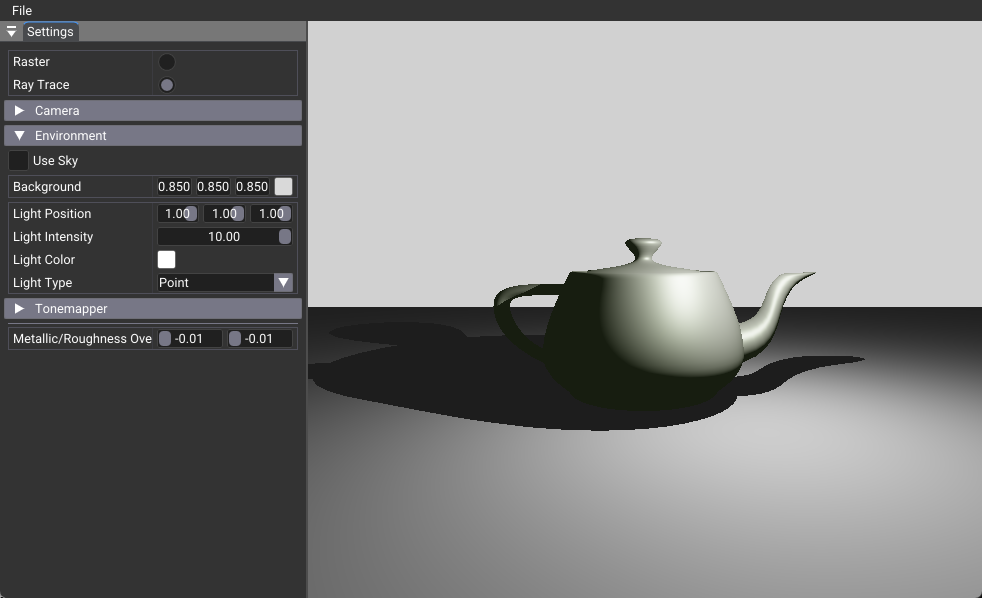
This tutorial demonstrates the foundational ray tracing implementation by converting the raster foundation to use ray tracing pipelines. It introduces the core concepts of ray-based rendering with acceleration structures, ray generation, closest hit, and miss shaders. This serves as the essential foundation that all subsequent ray tracing tutorials build upon.
Key Features
- Ray Tracing Pipeline: Multi-stage shader pipeline for ray-based rendering
- Acceleration Structures: BLAS and TLAS for efficient ray-geometry intersection
- Shader Binding Table: Management system for ray tracing shaders
- Ray Generation: Camera ray creation and dispatch
- Closest Hit Shading: Material shading at ray intersection points
- Miss Shader: Background/sky rendering for rays that miss geometry
Architecture Overview
This implementation transforms the raster foundation by replacing the traditional graphics pipeline with a ray tracing pipeline. Instead of rasterizing triangles, rays are generated from the camera and traced through the scene using acceleration structures for efficient intersection testing.
Pipeline Type: Ray tracing pipeline vs graphics pipeline
Shader Types: Ray generation, closest hit, miss shaders
Geometry Handling: Acceleration structures (BLAS/TLAS)
Rendering Method: vkCmdTraceRaysKHR vs vkCmdDrawIndexed
Key Components
- Acceleration Structures: BLAS for geometry, TLAS for instances
- Shader Binding Table: Ray tracing shader management
- Ray Tracing Pipeline: Multi-stage shader pipeline
- Descriptor Bindings: TLAS and output image bindings
Shader Structure
Ray Generation Shader
[shader("raygeneration")]
void rgenMain()
{
    // Generate camera rays and trace them
    RayDesc ray;
    ray.Origin = cameraPosition;
    ray.Direction = normalize(rayDirection);
    TraceRay(topLevelAS, rayFlags, 0xff, 0, 0, 0, ray, payload);
}
Closest Hit Shader
[shader("closesthit")]
void rchitMain(inout HitPayload payload, in BuiltInTriangleIntersectionAttributes attr)
{
    // Basic material shading at intersection point
    payload.color = float3(1, 0, 0); // Simple red color
}
Miss Shader
[shader("miss")]
void rmissMain(inout HitPayload payload)
{
    // Sky/background color for rays that miss geometry
    payload.color = float3(1, 1, 1); // White background
}
Key Differences from Foundation
- Pipeline Type: Graphics pipeline → Ray tracing pipeline
- Shader Types: Vertex/Fragment → Ray generation/Closest hit/Miss
- Geometry: Vertex buffers → Acceleration structures
- Rendering:
vkCmdDrawIndexed→vkCmdTraceRaysKHR - Descriptors: Added TLAS and output image bindings
- Memory: Added SBT buffer for shader binding table
Implementation Highlights
This basic implementation enables: - Global Illumination: Rays can bounce and gather lighting from any direction - Accurate Reflections: Perfect mirror-like surfaces without approximation - Complex Lighting: Multiple light sources with proper shadow casting - Future Extensions: Foundation for advanced effects like transparency, motion blur, and callable shaders
Next Steps
For step-by-step conversion guide, see rt_tutorial
This basic implementation can be extended with: - 03_any_hit - for transparency and alpha testing - 04_jitter_camera - for temporal anti-aliasing - 05_shadow_miss - for efficient shadow testing - 06_reflection - for mirror-like surfaces and global illumination - 07_multi_closest_hit - for different materials per object - 09_motion_blur - with animated acceleration structures
Related Documentation
For detailed information about the core ray tracing components:
- Acceleration Structures Guide - Comprehensive guide to BLAS/TLAS construction, memory management, and optimization
- Shader Binding Table Guide - Complete reference for SBT creation, alignment, and advanced usage patterns
- Ray Tracing Tutorial - Step-by-step progressive conversion guide from rasterization to ray tracing