Sample source
Browse the full sample on GitHub: raytrace_tutorial/13_callable_shader
13 Callable Shaders - Tutorial
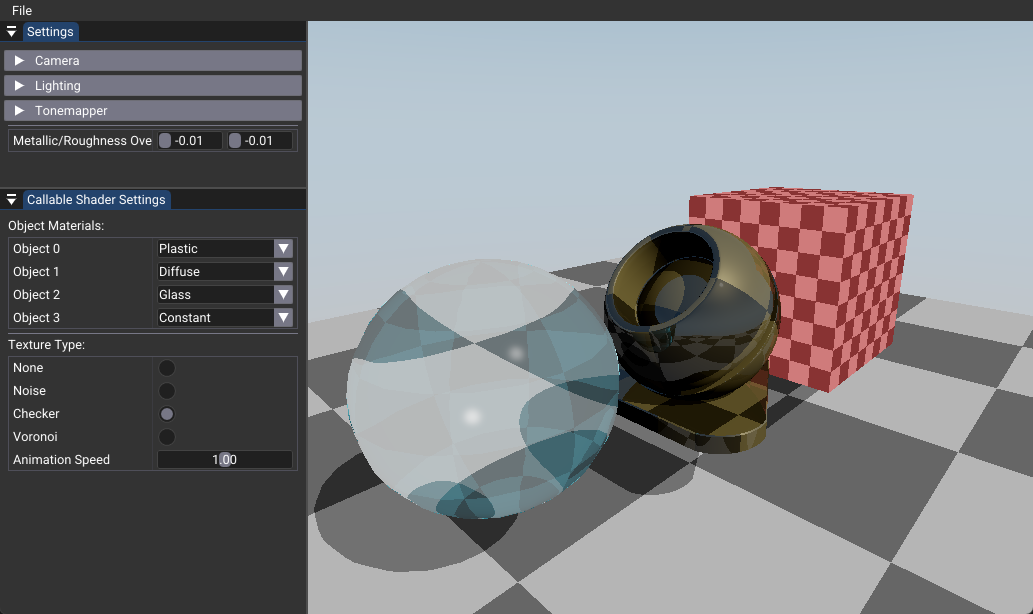
This tutorial demonstrates how to use callable shaders to create a modular material system with procedural textures. Callable shaders enable you to break complex shading logic into reusable, specialized functions that can be invoked dynamically during ray tracing, eliminating expensive branching in closest hit shaders.
Key Changes from 02_basic.cpp
1. Shader Changes
Modified: 13_callable_shader.slang
- Added callable shader functions for different material types (diffuse, plastic, glass, constant)
- Added procedural texture callable shaders (noise, checker, voronoi)
- Modified closest hit shader to use
CallShaderinstead of branching logic
[shader("callable")]
void material_diffuse_main(inout CallablePayload payload)
{
  // Simple Lambertian lighting - no reflection
  payload.weight = 0.0;
  float dotNL = max(dot(payload.worldNormal, payload.lightDir), 0.0);
  payload.color *= dotNL * payload.lightColor;
}

// In closest hit shader:
int materialType = InstanceID();  // Direct material lookup
CallShader<CallablePayload>(materialType, callablePayload);
2. C++ Application Changes
Modified: 13_callable_shader.cpp
- Extended
StageIndicesenum to include callable shader stages - Added callable shader groups to pipeline creation
- Modified TLAS creation to use material types in
instanceCustomIndex - Added material assignment UI controls
enum StageIndices
{
  eRaygen, eMiss, eClosestHit,
  // Material callable shaders
  eMaterialDiffuse, eMaterialPlastic, eMaterialGlass, eMaterialConstant,
  // Texture callable shaders
  eTextureNoise, eTextureChecker, eTextureVoronoi,
  eShaderGroupCount
};

// TLAS creation uses material type instead of mesh index
ray_inst.instanceCustomIndex = m_objectMaterials[i];
3. Data Structure Changes
Modified: Push constants and payload structures
- Added
TextureTypeenum for procedural texture selection - Created separate payload structures for material and texture callable shaders
- Added material assignment arrays for per-object material types
struct CallablePayload
{
  float3 color, worldPos, worldNormal, viewDir, lightDir, lightColor;
  RayDesc ray;
  float weight;
};

struct TextureCallablePayload
{
  float3 color;
  float2 uv;
};
4. UI Changes
Modified: onUIRender()
- Added material type selection for each object (requires TLAS recreation)
- Added texture type selection (push constant, no TLAS recreation needed)
- Added animation speed control for procedural textures
How It Works
Callable shaders work by extending the ray tracing pipeline with additional shader stages that can be invoked dynamically. Instead of using complex branching logic in the closest hit shader to handle different materials, each material is implemented as a separate callable shader function.
The key insight is using the instanceCustomIndex field in the TLAS to store material types directly. When a ray hits an object, InstanceID() returns this material type, allowing direct dispatch to the appropriate callable shader without any conditional logic.
Benefits
Performance Advantages
- Eliminates branching: Material selection happens at the TLAS level, not in shader code
- Better GPU utilization: Each material gets its own specialized shader
- Reduced compilation time: No complex branching logic to compile
Code Organization
- Modularity: Each material is a separate, reusable function
- Maintainability: Easy to add new materials without modifying existing code
- Debugging: Individual materials can be tested and debugged in isolation
Flexibility
- Runtime material selection: Materials can be changed without recompiling shaders
- Different payload types: Material and texture callable shaders can use different data structures
- Extensibility: Easy to add new material types or procedural textures
Technical Details
Material Types
The tutorial implements four different material types as callable shaders:
- Diffuse: Simple Lambertian lighting with no reflection
- Plastic: Metallic material with reflections using PBR model
- Glass: Transparent material with refraction and Fresnel effects
- Constant: Emissive material that emits light
Procedural Textures
Three procedural texture types are implemented:
- Noise: Animated polka dot pattern with wave distortion
- Checker: Static checkerboard pattern
- Voronoi: Animated cell pattern with time-based generation
Performance Considerations
Material Changes: Require TLAS recreation because instanceCustomIndex is part of the acceleration structure. This is expensive but necessary for proper material assignment.
Texture Changes: Use push constants and don't require TLAS recreation, making them much faster to modify at runtime.
Limitations
- Callable shaders cannot call other callable shaders or trace rays
- Additional SBT complexity and memory overhead
- More complex pipeline setup compared to basic ray tracing
Usage Instructions
Interactive Controls
- Material Type: Select material for each object (requires TLAS rebuild)
- Texture Type: Choose procedural texture (instant, no rebuild needed)
- Animation Speed: Control texture animation speed
Expected Behavior
- Different objects should display different materials based on selection
- Procedural textures should animate smoothly when enabled
- Material changes should trigger a brief pause while TLAS rebuilds
- Texture changes should be immediate with no performance impact