Sample source
Browse the full sample on GitHub: raytrace_tutorial/04_jitter_camera
04 Jitter Camera - Tutorial
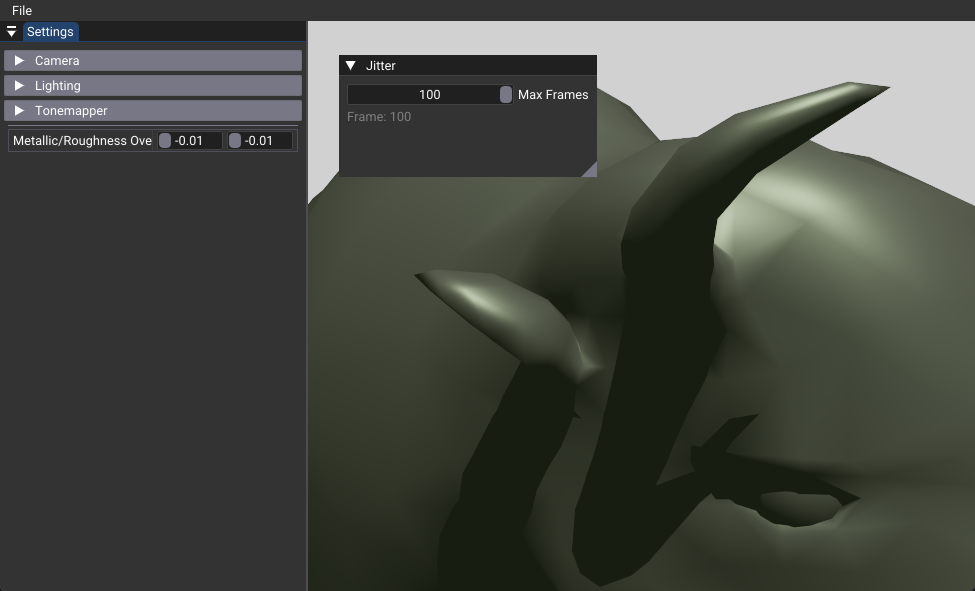
This tutorial demonstrates how to implement temporal antialiasing in ray tracing by jittering camera rays over multiple frames. Instead of shooting rays from fixed pixel centers, we randomly sample within each pixel and accumulate results over time to achieve smooth, high-quality antialiasing. This technique is essential for producing clean, professional ray-traced images without the jagged edges typical of single-sample rendering.
Key Changes from 02_basic.cpp
1. Shader Changes
Modified: shaders/rtjittercamera.slang
- Introduces deterministic random number generation using xxhash32 algorithm
- Implements subpixel jittering by sampling random positions within each pixel
- Adds temporal accumulation using exponential moving average blending
- Includes nvshaders/random.h.slang for random number utilities
Key Shader Concept:
// Deterministic random seed per pixel and frame
uint seed = xxhash32(uint3(uint2(launchID.xy), pushConst.frame));

// Subpixel jitter for antialiasing.
// generatePrimaryRay already targets the pixel center, so the jitter is
// expressed *relative* to that center: range [-0.5, 0.5). Frame 0 uses no
// jitter to render a clean reference image at the pixel center.
float2 subpixel_jitter = pushConst.frame == 0
                       ? float2(0.0f, 0.0f)
                       : float2(rand(seed) - 0.5f, rand(seed) - 0.5f);
RayDesc ray = generatePrimaryRay(launchID + subpixel_jitter, launchSize, sceneInfo[0]);
2. Data Structure Changes
Modified: shaders/shaderio.h
- Adds frame counter to push constants for tracking accumulation progress
- Enables shader to distinguish between first frame (no jitter) and subsequent frames
struct TutoPushConstant
{
  // ... existing members ...
  int frame;  // Frame number for temporal accumulation
};
3. C++ Application Changes
Modified: 04_jitter_camera.cpp
- Implements frame management system that tracks camera movement and scene changes
- Adds automatic frame reset when camera parameters change
- Introduces progressive rendering with configurable maximum frame count
- Extends UI with accumulation controls and frame counter display
Core Frame Management:
void updateFrame() {
  // Reset accumulation when camera moves
  if(cameraChanged) {
    resetFrame();
  }
  m_pushValues.frame = std::min(++m_pushValues.frame, m_maxFrames);
}
4. UI Changes
Modified: onUIRender()
- Adds
Max Framesslider (1-100) to control accumulation quality - Displays current frame counter for progress tracking
- Automatically resets accumulation when any scene parameter changes
How It Works
The jitter camera technique works by progressively improving image quality through temporal accumulation:
- Frame 0: Rays shoot from pixel centers (baseline image)
- Frame 1+: Rays shoot from random subpixel positions within each pixel
- Accumulation: Each new frame blends with previous results using exponential moving average
- Reset: Accumulation restarts when camera or scene parameters change
The random sampling within each pixel effectively creates multiple samples per pixel over time, reducing aliasing artifacts and producing smoother edges.
Benefits
- High-Quality Antialiasing: Eliminates jagged edges and moiré patterns
- Progressive Rendering: Image quality improves continuously over time
- Performance Control: Can stop rendering after reaching target quality
- Deterministic Results: Same random sequence produces consistent results
- Memory Efficient: Accumulation happens in-place without additional buffers
- Responsive Interaction: Immediate reset when scene changes
Technical Details
Random Number Generation: - Uses xxhash32 for deterministic, high-quality random numbers - Seed combines pixel coordinates and frame number for unique sequences per pixel - Ensures reproducible results across runs
Accumulation Algorithm:
- Exponential moving average: new_color = old_color * (1-α) + current_color * α
- Alpha value decreases with frame count: α = 1/(frame + 1)
- Provides smooth convergence to final result
Performance Considerations: - Frame counter clamped to prevent overflow and unnecessary computation - Rendering stops after reaching maximum frames to save GPU resources - Optimal quality typically achieved with 50-100 frames - Memory bandwidth remains constant regardless of frame count
Quality Control: - Maximum frame parameter allows balancing quality vs. performance - Automatic reset ensures fresh accumulation when scene changes - Frame counter provides visual feedback on accumulation progress