Sample source
Browse the full sample on GitHub: raytrace_tutorial/03_any_hit
03 Any Hit - Tutorial
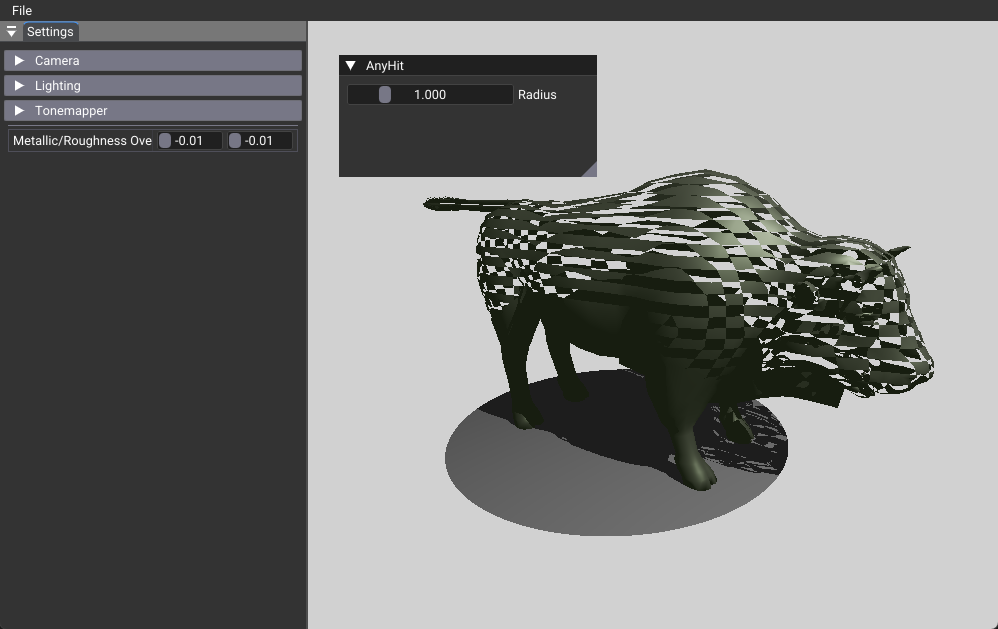
This tutorial introduces any-hit shaders, a powerful ray tracing feature that enables transparency effects, alpha testing, and procedural cutouts. Any-hit shaders execute for every intersection during ray traversal, allowing selective hit rejection to create transparent materials without complex geometry.
Learning Objective: Understand how any-hit shaders work and implement transparency effects using the IgnoreHit() function.
Key Changes from 02_basic.cpp
1. Shader Changes
Modified: shaders/rtanyhit.slang
- Added new any-hit shader stage to the ray tracing pipeline
- Implemented
anyhitMain()function that usesIgnoreHit()to create transparency effects - Created procedural patterns using position-based logic
[shader("anyhit")]
void anyhitMain(inout HitPayload payload, in BuiltInTriangleIntersectionAttributes attr)
{
  float3 pos = WorldRayOrigin() + WorldRayDirection() * RayTCurrent();

  // Circular cutout - core concept
  if(length(pos) > pushConst.radius)
  {
    IgnoreHit();  // Let ray pass through
    return;
  }
}
2. C++ Application Changes
Modified: 03_any_hit.cpp
- Added
eAnyHitstage to the shader pipeline enum - Attached any-hit shader to the triangles hit group
- Removed
VK_GEOMETRY_OPAQUE_BIT_KHRflag to enable any-hit shader execution
enum StageIndices
{
  eRaygen,
  eMiss,
  eClosestHit,
  eAnyHit,        // New any-hit shader stage
  eShaderGroupCount
};

// Attach any-hit shader to hit group
group.anyHitShader = eAnyHit;  // Enable any-hit shader
Key Change in primitiveToGeometry():
3. Data Structure Changes
Modified: Push Constants
- Added
radiusparameter to control the circular cutout size - Added
opacityparameter for transparency effects - Added
transparencyModeto switch between different transparency techniques
struct TutoPushConstant
{
  // ... existing members ...
  float radius = 1.0f;              // Circular cutout radius
  float opacity = 0.5f;             // Transparency level (0=transparent, 1=opaque)
  int   transparencyMode = 0;       // 0=cutout, 1=stochastic, 2=accumulative
};
4. UI Changes
Modified: onUIRender()
- Added slider control to adjust the cutout radius interactively
- Added transparency controls for opacity and mode selection
        ImGui::SeparatorText("AnyHit");
        ImGui::SliderFloat("Radius", &m_pushValues.radius, 0.01f, 5.0f);

        ImGui::SeparatorText("Transparency");
        ImGui::SliderFloat("Opacity", &m_pushValues.opacity, 0.0f, 1.0f);
        const char* transparencyModes[] = {"Cutout Only", "Stochastic", "Accumulative"};
        ImGui::Combo("Mode", &m_pushValues.transparencyMode, transparencyModes, 3);
How It Works
Any-hit shaders are called for every intersection during ray traversal, unlike closest-hit shaders which only execute for the nearest intersection. This enables powerful transparency and alpha testing effects by selectively ignoring intersections.
Key Mechanism: The IgnoreHit() function tells the ray tracer to discard the current intersection and continue traversal, allowing rays to "pass through" certain geometry.
Execution Order:
- Ray intersects with geometry
- Any-hit shader executes (if present)
- If
IgnoreHit()is called, intersection is discarded and traversal continues - If no
IgnoreHit(), closest-hit shader executes for the intersection
Benefits
- Transparency Effects: Create transparent materials without complex geometry
- Alpha Testing: Implement texture-based transparency for foliage, fences, and other complex surfaces
- Procedural Cutouts: Generate complex patterns and shapes programmatically
- Performance: More efficient than using actual transparent geometry in some cases
Technical Details
Performance Considerations
- Frequent Execution: Any-hit shaders run for every intersection, so keep them lightweight
- Branch Divergence: Complex logic can cause performance issues on GPU
- Geometry Flags: Use
VK_GEOMETRY_NO_DUPLICATE_ANY_HIT_INVOCATION_BIT_KHRto avoid duplicate calls
Common Use Cases
- Alpha Testing: Discard intersections based on texture alpha values
- Procedural Transparency: Create patterns, cutouts, and complex shapes
- Shadow Optimization: Skip certain intersections for shadow rays
- Custom Intersection Logic: Implement specialized intersection behavior
Usage Instructions
Interactive Controls
- Radius Slider: Adjust the circular cutout size from 0.01 to 5.0 units
- Opacity Slider: Control transparency level (0.0 = fully transparent, 1.0 = fully opaque)
- Mode Selection: Choose between different transparency techniques
Expected Behavior
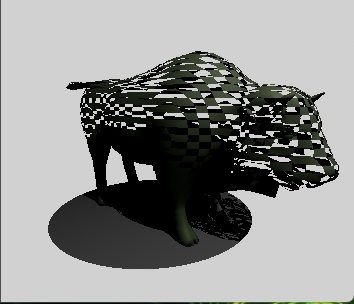
- Cutout Only: Binary transparency with circular cutout and checkerboard pattern
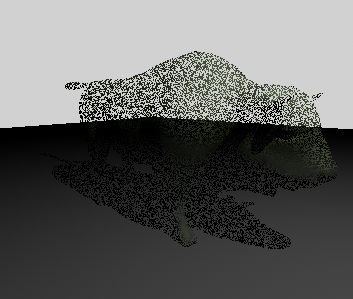
- Stochastic: Random sampling-based transparency with noise
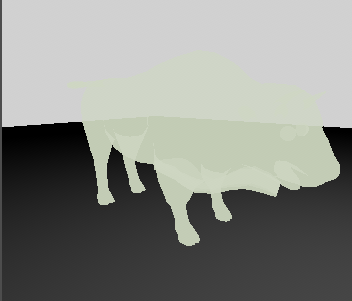
- Accumulative: Proper transparency with color accumulation
Advanced Transparency Techniques
The tutorial implements three transparency modes to demonstrate different approaches:
Mode 0: Cutout Transparency
- Concept: Binary transparency using
IgnoreHit()for complete cutouts - Use Case: Fences, foliage, architectural elements
- Performance: Fastest, no color accumulation needed
Mode 1: Stochastic Transparency
- Concept: Random sampling based on opacity value
- Use Case: Real-time transparency with acceptable noise
- Performance: Fast but requires temporal accumulation for quality
Mode 2: Accumulative Transparency
- Concept: Color accumulation through transparent surfaces
- Use Case: Glass, water, simple transparency
- Performance: More expensive but simple
Key Implementation Concepts
Stochastic Transparency: Uses high-quality pseudo-random number generation (xxhash32 + PCG) to decide whether to ignore hits. The seed combines pixel coordinates, frame number, and per-intersection identifiers (PrimitiveIndex() and InstanceID()) — including the hit identifiers gives each transparent surface along the same ray a decorrelated random stream, so stacked transparencies in one pixel no longer share a single coin flip. The frame number is incremented in onRender() to ensure proper temporal variation for accumulation effects.
Accumulative Transparency: Modifies the ray payload to accumulate color contributions and reduce ray weight as it passes through transparent surfaces.
Alpha Testing: Can be extended to sample texture alpha values and use them for transparency decisions.
Performance Trade-offs
- Cutout: Fastest, binary decisions only
- Stochastic: Fast but noisy, requires temporal filtering (see 04_jitter_camera)
- Accumulative: Most accurate but requires careful payload management
Implementation Details
Critical Setup Requirements
- Geometry Flags: Must remove
VK_GEOMETRY_OPAQUE_BIT_KHRfrom acceleration structure geometry to enable any-hit shader execution - Shader Binding: Any-hit shader must be attached to the hit group in the ray tracing pipeline
Common Pitfalls
- Missing Geometry Flag: Any-hit shaders won't execute if geometry is marked as opaque
- Heavy Any-Hit Logic: Keep any-hit shaders lightweight as they execute frequently
Next Steps
This any-hit implementation can be extended with:
- 04_jitter_camera - Add temporal anti-aliasing to reduce noise
- 05_shadow_miss - Optimize shadow rays with any-hit shaders
- 06_reflection - Combine with reflection rays for complex materials
- 13_callable_shader - Use callable shaders for complex any-hit logic