Sample source
Browse the full sample on GitHub: raytrace_tutorial/09_motion_blur
09 Motion Blur - Tutorial
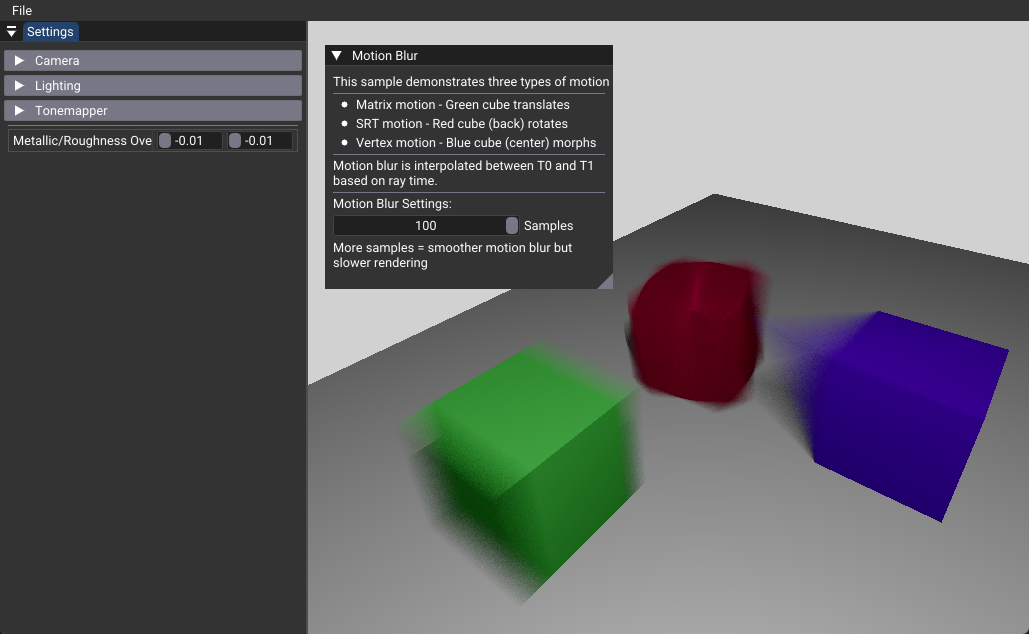
This tutorial demonstrates how to implement realistic motion blur in ray tracing using the VK_NV_ray_tracing_motion_blur extension. Motion blur simulates the temporal effects of fast-moving objects by interpolating between different states over time and accumulating multiple temporal samples per pixel.
Key Changes from 02_basic.cpp
1. Extension Setup
Modified: Application initialization - Added VK_NV_ray_tracing_motion_blur extension support - Enabled motion blur features in Vulkan context initialization - This extension is required for all motion blur functionality
2. Scene Data Changes
Modified: createScene()
- Added a modified cube mesh with vertex position changes for vertex motion demonstration
- Created three colored cubes to demonstrate different motion types:
- Green cube: Matrix motion (translation)
- Red cube: SRT motion (rotation)
- Blue cube: Vertex motion (morphing)
3. Acceleration Structure Changes
Modified: createBottomLevelAS() and createTopLevelAS()
- Motion-enabled BLAS creation using VK_BUILD_ACCELERATION_STRUCTURE_MOTION_BIT_NV
- Vertex motion BLAS with dual vertex data (T0 and T1 positions)
- Motion instances with 160-byte stride alignment requirement
- Three motion instance types: Matrix, SRT, and Vertex motion
4. Shader Changes
Modified: Ray generation shader
- Replaced TraceRay() with TraceMotionRay() for temporal ray tracing
- Added temporal sampling loop with random time generation
- Sample accumulation and averaging for smooth motion blur
[shader("raygeneration")]
void rgenMain()
{
    // Accumulate multiple temporal samples
    float3 result = float3(0, 0, 0);
    for(int i = 0; i < pushConst.numSamples; i++)
    {
        float time = rand(seed);  // Random time between 0.0-1.0
        TraceMotionRay(topLevelAS, rayFlags, 0xff, 0, 0, 0, ray, time, payload);
        result += payload.color;
    }
    outImage[int2(launchID)] = float4(result / float(pushConst.numSamples), 1.0);
}
5. Pipeline Changes
Modified: createRayTracingPipeline()
- Added VK_PIPELINE_CREATE_RAY_TRACING_ALLOW_MOTION_BIT_NV flag
- Enables motion blur support in the ray tracing pipeline
6. UI Changes
Modified: onUIRender()
- Added sample count slider for motion blur quality control
- Explanatory text about the three motion types
- Performance guidance for sample count selection
How It Works
Motion blur in ray tracing works by creating acceleration structures that can interpolate between two states (T0 and T1) based on a time parameter. When tracing rays, each ray gets a random time value between 0.0 and 1.0, causing the acceleration structure to interpolate the object's position, rotation, or vertex positions at that specific moment in time.
The final image is created by accumulating multiple temporal samples per pixel and averaging the results, creating the characteristic motion blur effect.
Motion Blur Types
Matrix Motion
- Purpose: General object transformation (translation, scaling, rotation)
- Data: Two 4x4 transformation matrices
- Interpolation: Linear matrix interpolation
- Use Case: Moving objects, camera motion
SRT Motion
- Purpose: Independent scale, rotation, and translation
- Data: Separate scale, rotation (quaternion), and translation components
- Interpolation: Component-wise (slerp for rotation)
- Use Case: Complex animations with independent motion components
Vertex Motion
- Purpose: Object deformation and morphing
- Data: Two complete sets of vertex positions
- Interpolation: Per-vertex linear interpolation
- Use Case: Character animation, fluid simulation, morphing effects
Benefits
- Realistic Motion: Simulates real-world camera and object motion blur
- Temporal Anti-aliasing: Reduces temporal flickering and aliasing
- Performance: Hardware-accelerated motion blur without post-processing
- Flexibility: Three motion types cover most animation scenarios
Technical Details
Performance Considerations
- Sample Count: 10-20 samples recommended for good quality/performance balance
- Memory Overhead: Motion instances are 2.5x larger than standard instances (160 vs 64 bytes)
- Build Time: Motion-enabled acceleration structures take longer to build
- Shader Overhead:
TraceMotionRay()has additional computational cost
Memory Requirements
- Motion instances require 160-byte alignment
- Vertex motion BLAS needs storage for both T0 and T1 vertex data
- Increased scratch buffer requirements for motion-enabled builds
Quality vs Performance
- 1-5 samples: Fast but noisy motion blur
- 10-20 samples: Good quality (recommended)
- 50-100 samples: Very smooth but significantly slower
Usage Instructions
- Adjust Sample Count: Use the UI slider to control motion blur quality
- Observe Motion Types: Each cube demonstrates a different motion technique
- Performance Tuning: Start with low sample counts and increase as needed
- Debug Mode: Set samples to 1 to verify motion setup without accumulation
The motion blur effect becomes more pronounced with higher sample counts, but performance decreases proportionally. The three motion types can be combined in the same scene for complex animations.