Sample source
Browse the full sample on GitHub: raytrace_tutorial/01_foundation
01 Foundation - Rasterization Base
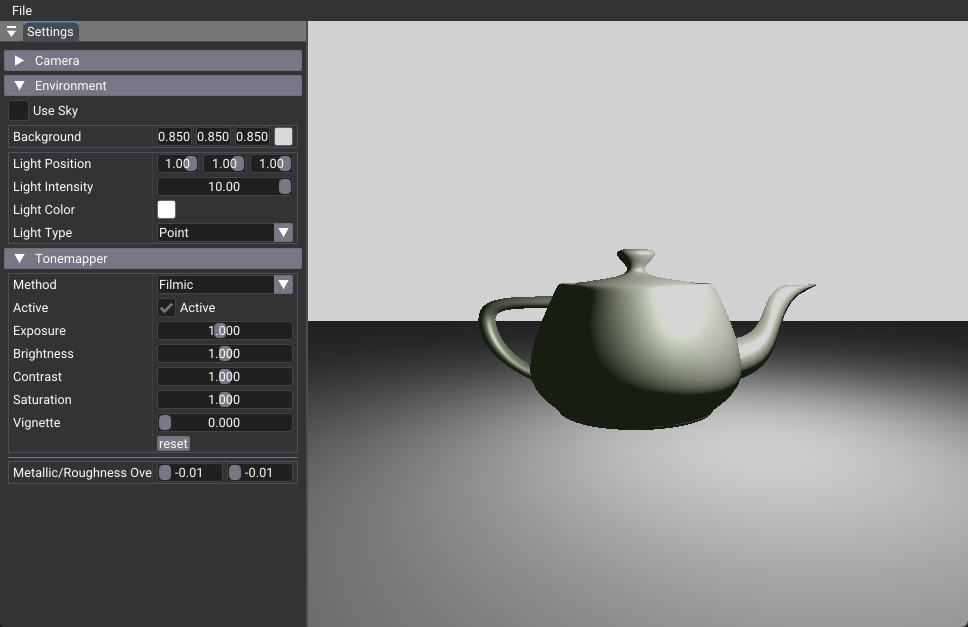
This tutorial demonstrates a modern Vulkan 1.4 raster-based renderer that serves as the foundation for all subsequent ray tracing tutorials. It showcases a complete glTF scene renderer using Shader Objects, Push Descriptors, and Dynamic Rendering - the same modern Vulkan features that make ray tracing conversion straightforward and efficient.
Key Features
- Modern Vulkan Pipeline: Shader Objects and Push Descriptors for flexible rendering
- glTF Scene Loading: Complete glTF 2.0 support with tinyGLTF integration
- GPU Resource Management: Efficient mesh and texture handling with
nvsamples::GltfMeshResource - Dynamic Rendering: Modern Vulkan 1.4 features for simplified pipeline management
- Post-Processing: Tonemapping and sky rendering capabilities
- Ray Tracing Ready: Architecture designed for minimal changes when converting to ray tracing
Architecture Overview
This implementation uses a traditional graphics pipeline with vertex and fragment shaders, but leverages modern Vulkan 1.4 features that simplify the transition to ray tracing. The pipeline processes glTF scenes through vertex transformation, material shading, and post-processing stages.
Pipeline Type: Traditional graphics pipeline with vertex/fragment shaders
Modern Vulkan Features: Shader Objects, Push Descriptors, Dynamic Rendering
Scene Management: glTF loading and GPU resource management
Rendering Method: vkCmdDrawIndexed with modern descriptor binding
Key Components
- Scene Loading: tinyGLTF integration with complete glTF 2.0 support
- Resource Management:
nvsamples::GltfMeshResourceandshaderio::GltfSceneInfo - Modern Pipeline: Shader Objects and Push Descriptors for flexible binding
- Shader Language: Slang shaders for modern cross-platform compatibility
- Post-Processing: Tonemapping and sky rendering with dedicated shaders
Shader Structure
Vertex Shader
[shader("vertex")]
VSout vertexMain(VSin input, uint vertexIndex: SV_VertexID)
{
  // Transform vertex position and normal to world space
  float4 pos = mul(float4(posMesh, 1.0), instance.transform);
  output.sv_position = mul(pos, sceneInfo.viewProjMatrix);
  output.worldPos = pos.xyz;
  return output;
}
Fragment Shader
[shader("pixel")]
PSout fragmentMain(VSout stage)
{
  // PBR material shading with light calculation
  float3 color = pbrMetallicRoughness(albedo, metallic, roughness, N, V, L);
  color *= light.color * light.intensity;
  return float4(clamp(color, 0.0, 1.0), 1.0);
}
Key Differences from Ray Tracing
- Pipeline Type: Graphics pipeline → Ray tracing pipeline
- Shader Types: Vertex/Fragment → Ray generation/Closest hit/Miss
- Geometry: Vertex buffers → Acceleration structures
- Rendering:
vkCmdDrawIndexed→vkCmdTraceRaysKHR - Descriptors: Added TLAS and output image bindings
- Memory: Added SBT buffer for shader binding table
Implementation Highlights
This foundation enables: - Modern Vulkan Features: Shader Objects and Push Descriptors simplify ray tracing conversion - Efficient Resource Management: glTF loading and GPU resource handling remain unchanged - Flexible Shader System: Slang shaders provide cross-platform compatibility - Post-Processing Pipeline: Tonemapping and sky rendering work with both raster and ray tracing
Usage
Controls
- Mouse: Rotate camera around the scene
- WASD / Arrow Keys: Move camera
- Q / E: Move camera up/down
- Right Mouse + Drag: Pan camera
- Scroll Wheel: Zoom in/out
- UI Panel: Adjust tonemapper, sky, and material parameters
Scene Format
- Supports glTF 2.0 scenes (embedded or binary)
- Place textures and models in the working directory or provide a path
Next Steps
For conversion to ray tracing, see 02_basic which demonstrates the step-by-step transformation from this raster foundation to a complete ray tracing implementation.
This foundation can be extended with: - 02_basic - Convert to ray tracing with BLAS/TLAS and ray generation - 03_any_hit - Add transparency and alpha testing - 04_jitter_camera - Implement temporal anti-aliasing - 05_shadow_miss - Add efficient shadow rays - 06_reflection - Introduce reflection and global illumination
Related Documentation
For detailed conversion information: - Ray Tracing Tutorial - Step-by-step conversion guide - Acceleration Structures Guide - BLAS/TLAS construction and management - Shader Binding Table Guide - SBT creation and alignment